C_Meng PSNA

Never wait for the storm to pass, just dance in the rain.

0%

前言

这篇文章译自:https://learnxinyminutes.com/docs/lambda-calculus/,写的精简了点,理解起来可能有些困难

建议配合让我们谈谈 $\lambda$ 演算.pdf一起食用(出自https://github.com/txyyss/Lambda-Calculus/releases)。这篇不算长,深入浅出,写的也极好。

整体介绍

Lambda演算( $\lambda$ 演算)由Alonzo Church提出,是世界上最简洁的编程语言。尽管没有数字、字符串、布尔值等非函数数据类型,lambda演算还是可以表达任何图灵机。

Lambda演算由三种元素组成:变量(variables),函数(functions),以及应用(applications)。

名称 语法 例子 解释
Variable <name> x 一个名为“x”的变量
Function $\lambda$ <parameters>.<body> $\lambda$ x.x 一个拥有参数“x”以及函数体x的函数
Application <function><variable or function> ( $\lambda$ x.x).a 调用函数“ $\lambda$ x.x”且参数值为“a”

最基础的函数就是恒等函数: $\lambda$ x.x(即f(x)=x)。第一个“x”代表函数的参数,第二个“x”代表函数体。

自由变量vs约束变量

  • 在 $\lambda$ x.x函数中,x被称为约束变量,因为它同时位于函数体和参数中。
  • 在 $\lambda$ x.y函数中,y被称为自由变量,因为它从未被事先声明过。

计算

通过 $\beta$ 规约进行计算,其基本上是词法范围的替代。

在计算表达式( $\lambda$ x.x)a时,我们用“a”替换函数体中出现的所有“x”。

  • ( $\lambda$ x.x)a 计算结果为:a
  • ( $\lambda$ x.y)a 计算结果为:y

也可以创建高阶函数:

  • ( $\lambda$ x.( $\lambda$ y.x))a 计算结果为: $\lambda$ y.a

虽然lambda演算传统上只支持单参数函数,但是我们可以使用一种称为currying的技术创建多参数函数。

  • ( $\lambda$ x. $\lambda$ y. $\lambda$ z.xyz) 即 f(x, y, z) = ((x y) z)

有时 $\lambda$ xy.<body>可与 $\lambda$ x. $\lambda$ y.<body>交替使用。

重要的是要认识到传统的lambda演算没有数字,字符或任何非函数数据类型!

布尔逻辑

在lambda演算中没有“True”或“False”。甚至没有1或0。

取而代之的是:

  • T表示为: $\lambda$ x. $\lambda$ y.x
  • F表示为: $\lambda$ x. $\lambda$ y.y

首先,我们可以定义一个“if”函数 $\lambda$ btf,如果b为True则返回t,如果b为False则返回f

IF 也等同于 $\lambda$ b. $\lambda$ t. $\lambda$ f.b t f

通过使用IF,我们可以定义基础的布尔逻辑运算:

  • a AND b 等同于: $\lambda$ ab.IF a b F
  • a OR b 等同于: $\lambda$ ab.IF a T b
  • NOT a 等同于: $\lambda$ a.IF a F T

注意: IF a b c 本质上是: IF((a b) c)

数字

尽管lambda演算中没有数字,我们可以通过邱奇数编码数字。

任意数字n都可以编码为: $n = \lambda f.f^n$ 。因此:

  • 0 = $\lambda$ f. $\lambda$ x.x
  • 1 = $\lambda$ f. $\lambda$ x.f x
  • 2 = $\lambda$ f. $\lambda$ x.f(f x)
  • 3 = $\lambda$ f. $\lambda$ x.f(f(f x))

为了增加邱奇数,我们使用继承函数s(n)=n+1,即

S = $\lambda$ n. $\lambda$ f. $\lambda$ x.f((n f) x)

通过继承,我们可以定义add:

ADD = $\lambda$ ab.(a S)b

挑战:试着定义你自己的乘法函数!

变得更精致:SKI,SK以及Iota

SKI组合子演算

使S, K, I,分别为以下函数:

  • I x = x
  • K x y = x
  • S x y z = x z (y z)

我们可以将lambda演算中的表达式转换为SKI组合子演算中的表达式:

  1. $\lambda$ x.x = I
  2. $\lambda$ x.c = Kc
  3. $\lambda$ x.(y z) = S ( $\lambda$ x.y) ( $\lambda$ x.z)

以邱奇数2为例子:

2 = $\lambda$ f. $\lambda$ x.f(f x)

对于内部部分 $\lambda$ x.f(f x):

$$\begin{split}
\lambda x.f(f x) &=& S ( \lambda x.f) ( \lambda x.(f x)) (case 3) \\
&=& S (K f) (S ( \lambda x.f) ( \lambda x.x)) (case 2, 3) \\
&=& S (K f) (S (K f) I) (case 2, 1)
\end{split}$$

因此:

$$\begin{split}
2
&=& \lambda f. \lambda x.f(f x) \\
&=& \lambda f.(S (K f) (S (K f) I)) \\
&=& \lambda f.((S (K f)) (S (K f) I)) \\
&=& S ( \lambda f.(S (K f))) ( \lambda f.(S (K f) I)) (case 3)
\end{split}$$

对于第一个参数 $\lambda f.(S (K f))$ :

$$\begin{split}
\lambda f.(S (K f))
&=& S ( \lambda f.S) ( \lambda f.(K f)) (case 3)\\
&=& S (K S) (S ( \lambda f.K) ( \lambda f.f)) (case 2, 3)\\
&=& S (K S) (S (K K) I) (case 2, 3)
\end{split}$$

对于第二个参数 $\lambda f.(S (K f) I)$ :

$$\begin{split}
\lambda f.(S (K f) I)
&=& \lambda f.((S (K f)) I)\\
&=& S ( \lambda f.(S (K f))) ( \lambda f.I) (case 3)\\
&=& S (S ( \lambda f.S) ( \lambda f.(K f))) (K I) (case 2, 3)\\
&=& S (S (K S) (S ( \lambda f.K) ( \lambda f.f))) (K I) (case 1, 3)\\
&=& S (S (K S) (S (K K) I)) (K I) (case 1, 2)
\end{split}$$

合到一起:

$$\begin{split}
2
&=& S ( \lambda f.(S (K f))) ( \lambda f.(S (K f) I))\\
&=& S (S (K S) (S (K K) I)) (S (S (K S) (S (K K) I)) (K I))
\end{split}$$

SK 组合子运算

SKI组合子运算仍可进一步简化。我们可以通过注意I = SKK来移除I组合子。我们可以用SKK替换所有I。

Iota组合子

SK组合子运算依然不是最简洁的。定义:

$$\begin{split}
ι = \lambda f.((f S) K)
\end{split}$$

我们就有:

$$\begin{split}
I &=& ιι\\
K &=& ι(ιI) = ι(ι(ιι))\\
S &=& ι(K) = ι(ι(ι(ιι)))
\end{split}$$

Abstract

purpose

This paper seeks to make sense of the myriad BPM standards, organizing them in a classification framework, and to identify key industry trends.

Design/methodology/approach

Proposed BPM Standards Classification Framework to list each standard’s distinct features, strengths and weaknesses.

Findings

An attempt is made to classify BPM languages, standards and notations into four main groups: execution, interchange, graphical, and diagnosis(lack) standards.

Practical implications

Researchers and practitioners may wish to position their work around this review.

Originality/value

No body did before.

Keywords

Process management, Standards, Work flow

Paper type

Literature review

Introduction

The growth of business process management

Some factors:

  • the rise in frequency of goods ordered;
  • the need for fast information transfer;
  • quick decision making;
  • the need to adapt to change in demand;
  • more international competitors; and
  • demands for shorter cycle times

Software tools supporting the management of such operational processes became known as business process management systems (BPMS).

The proliferation of BPM languages, standards and software systems

Naturally, interest in BPM from practitioners and researchers grew rapidly.

Many new BPM terminologies and technologies are often not well defined and understood by many practitioners and researchers using them.New languages and notations proposed often contain duplicating features for similar concepts, and loosely claim to be based on theoretical formalisms such as Pi-calculus and Petri nets. Most of them have also not been validated, especially in a real business and office environment.

Motivation of this paper

This paper’s goal is to leave the reader with some semblance of order out of a disparate collection of specifications, white papers, journal publications, conference publications and workshop notes to be consolidated as a single paper.

  • discuss and rationalize the terminologies associated with BPM and its standards;
  • systematically categorize/classify BPM standards;
  • discuss the current strengths and limitations of each standard;
  • clarify, the differences of theoretical underpinnings of prominent BPM standards; and
  • explore the gaps of knowledge of current BPM standards and how these may be bridged.

BPM basics

The BPM life cycle

Term Explanation
Process design In this stage, fax- or paper-based as-is business processes are electronically modeled into BPMS. Graphical standards are dominant in this stage.
System configuration This stage configures the BPMS and the underlying system infrastructure. This stage is hard to standardize due to the differing IT architectures of different enterprises.
Process enactment Electronically modeled business processes are deployed in BPMS engines. Execution standards dominate this stage.
Diagnosis Given appropriate analysis and monitoring tools, the BPM analyst can identify and improve on bottlenecks and potential fraudulent loopholes in the business processes. The tools to do this are embodied in diagnosis standards.

BPM vs BPR vs WfM

  • BPM: Business Process Management
  • BPR: Business Process Reengineering
  • WfM: Workflow Management

BPM vs BPR

BPR calls for a radical obliteration of existing business processes, its descendant BPM is more practical, iterative and incremental in fine-tuning business processes.

BPM vs WfM

  • One viewpoint by Gartner research views BPM as a management discipline with WfM supporting it as a technology.
  • Another viewpoint from academics is that the features stated in WfM according to Georgakopoulos et al. is a subset of BPM defined by van der Aalst et al., with the diagnosis stage of the BPM life cycle as the main difference.

BPM theory vs BPM standards and languages vs BPMS

BPMS/BPMSs: Business Process Management Suites

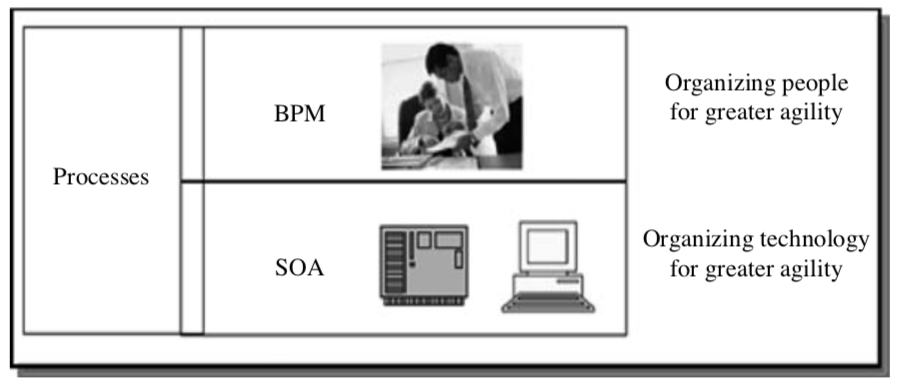
BPM vs service oriented architecture

SOA: Service Oriented Architecture

BPM is a process-oriented management discipline aided by IT while SOA is an IT architectural paradigm.

According to Gartner (Hill et al., 2006), BPM “organizes people for greater agility” while SOA “organizes technology for greater agility”.

Categorising the BPM standards

B2B: business-to-business

  • Graphical standards. This allows users to express business processes and their possible flows and transitions in a diagrammatic way.
  • Execution standards. It computerizes the deployment and automation of business processes.
  • Interchange standards. It facilitates portability of data, e.g. the portability of business process designs in different graphical standards across BPMS; different execution standards across disparate BPMS, and the context-less translation of graphical standards to execution standards and vice versa.
  • Diagnosis standards. It provides administrative and monitoring (such as runtime and post-modeling) capabilities. These standards can identify bottlenecks, audit and query real-time the business processes in a company.

译自:https://learnxinyminutes.com/docs/python3/

阅前须知:

  • “#”后边的是注释
  • 带行号的是python代码
  • 不带行号的是代码的输出
  • 把下边的语句对着敲一边自然就会了,博主用的是jupyter notebook
1
2
3
####################################################
## 6. Classes
####################################################
1
2
3
4
5
6
7
8
9
10
11
12
13
14
15
16
17
18
19
20
21
22
23
24
25
26
27
28
29
30
31
32
33
34
35
36
37
38
39
40
41
42
43
44
45
46
47
48
49
50
51
52
53
54
55
56
57
58
# 通过class声明,来创建一个类
# 类内方法中,self为一个保留字,代表类实例化后instance自身
# 类内方法中,cls也是一个保留字,代表类class自身
# 通过self.***可以给类内属性赋值,或调用类内方法
class Human:

# 直接定义的变量,是这个类的共享属性,所有实例都可以访问
species = "H. sapiens"

# __init__是一个保留方法,用于类的实例化(生成实例时自动调用)
# 注意:名称前后有双下划线__,代表这个对象或者属性是python调用、用户定义的
# 这类方法(对象、属性)包括: __init__, __str__, __repr__ etc.
# 这类特殊方法,也被称作(dunder method)
# 不要自己创造这类方法
def __init__(self, name):
# 将参数分配给实例的name属性
self.name = name

# 初始化私有属性,前方带下划线_的属性无法在外部直接访问
self._age = 0

# 这是类的一个内建方法,所有内建的方法都需要把self作为其第一个形式参数
def say(self, msg):
print("{name}: {message}".format(name=self.name, message=msg))

# 另一个方法
def sing(self):
return 'yo... yo... microphone check... one two... one two...'

# @classmethod是一个声明,声明接下来定义的方法是该类所有实例的共享方法
# 这种方法被调用时,必须有cls作为第一个参数
# 类方法的特点在于,可以被类自身调用,如Human.get_species()
@classmethod
def get_species(cls):
return cls.species

# @staticmethod声明接下来定义的是一个静态方法
# 静态方法可以被类单独调用
@staticmethod
def grunt():
return "*grunt*"

# @property就是一个getter,声明该方法用于访问内部属性
# @property这个声明,将age()方法转换为同名的只读属性。
# 但是,不需要在Python中编写琐碎的getter和setter。
@property
def age(self):
return self._age

# 如果还想要让该属性可更改,可以这么写
@age.setter
def age(self, age):
self._age = age

# deleter可以让该属性可删除
@age.deleter
def age(self):
del self._age
1
2
3
4
5
6
7
8
9
10
11
12
13
14
15
16
17
18
19
20
21
22
23
24
25
26
27
28
29
30
31
32
33
# __name__代表的是运行进程的名称
# __name__ == '__main__',判断用户是否是将该python文件当作主要脚本运行
# 简单来说,if __name__ == '__main__':代码块中的内容
# 只有在运行该python文件时才会生效,如果该python文件是以import形式被调用,则不会运行
# 而写在if __name__ == '__main__':代码块外的内容,被import时,也会运行
if __name__ == '__main__':
# 生成Human类的实例
# 类名加括号,直接调用__init__方法
i = Human(name="Ian")
i.say("hi") # "Ian: hi"
j = Human("Joel")
j.say("hello") # "Joel: hello"
# i and j 是Human类的两个实例
# 调用类方法
i.say(Human.get_species()) # "Ian: H. sapiens"
# 共享属性改了之后,大家都改了
Human.species = "H. neanderthalensis"
i.say(i.get_species()) # => "Ian: H. neanderthalensis"
j.say(j.get_species()) # => "Joel: H. neanderthalensis"

# 类可以调用静态函数
print(Human.grunt()) # => "*grunt*"

# 有些版本中实例是不能调用静态函数的
print(i.grunt())

# 更新实例的属性
i.age = 42
# 获取property
i.say(i.age) # => "Ian: 42"
j.say(j.age) # => "Joel: 0"
# 删除i的age属性
del i.age
Ian: hi
Joel: hello
Ian: H. sapiens
Ian: H. neanderthalensis
Joel: H. neanderthalensis
*grunt*
*grunt*
Ian: 42
Joel: 0
1
2
# 再访问i的年龄就会报错
i.age
---------------------------------------------------------------------------

AttributeError                            Traceback (most recent call last)

<ipython-input-207-993258cc61d3> in <module>()
      1 # 再访问i的年龄就会报错
----> 2 i.age


<ipython-input-186-b3205f030117> in age(self)
     44     @property
     45     def age(self):
---> 46         return self._age
     47 
     48     # 如果还想要让该属性可更改,可以这么写


AttributeError: 'Human' object has no attribute '_age'
1
2
# 不仅仅是age()没了,_age这个属性是真的没了
i._age
---------------------------------------------------------------------------

AttributeError                            Traceback (most recent call last)

<ipython-input-208-4ea879b64970> in <module>()
      1 # 不仅仅是age()没了,_age这个属性是真的没了
----> 2 i._age


AttributeError: 'Human' object has no attribute '_age'
1
2
3
####################################################
## 6.1 继承
####################################################
1
# 继承允许定义新的子类,这些子类从父类继承方法和变量
1
2
3
4
5
6
7
8
9
10
# 使用上面定义的Human类作为基类或父类,我们可以定义一个子类Superhero
# 它继承了类的变量如“species”,“name”和“age”,
# 以及“sing”和“grunt”等方法
# 但superhero也可以拥有自己的属性

# 如果要将文件模块化,您可以将上面的类放在自己的文件中,命名为human.py

# 要从其他文件导入功能,请使用以下格式
# from “filename(不加扩展名.py)” import “函数名或类名”
from human import Human
1
2
3
4
5
6
7
8
9
10
11
12
13
14
15
16
17
18
19
20
21
22
23
24
25
26
27
28
29
30
31
32
33
34
35
36
37
38
39
# 将父类当作参数写进子类定义作为声明
# 如:class child(parent):

class Superhero(Human):

# 如果您想让子类继承父类的所有定义且没有任何修改
# 您可以只使用“pass”关键字(而不使用其他关键字)
# 如
# class Human2(Human):
# pass

# 子类可以重写其父类的属性
species = 'Superhuman'

# 子类自动继承其父类的构造函数(__init__),包括它的参数
# 但也可以定义其他参数或定义并重写其方法
# 此构造函数从“human”类继承“name”参数
# 并且添加“superpower”和“movie”参数:
def __init__(self, name, movie=False,
superpowers=["super strength", "bulletproofing"]):

# 增加新的属性
self.fictional = True
self.movie = movie
# 注意可变的默认值,因为默认值是共享的
self.superpowers = superpowers

# “super”是一个保留函数,该函数允许您访问父类的方法
# 下面的语句将调用父类构造函数:
super().__init__(name)

# 覆盖sing方法
def sing(self):
return 'Dun, dun, DUN!'

# 增加实例方法
def boast(self):
for power in self.superpowers:
print("I wield the power of {pwr}!".format(pwr=power))
1
2
3
4
5
6
7
8
9
10
11
12
13
14
15
16
17
18
19
20
21
22
23
24
25
26
27
28
29
30
31
32
if __name__ == '__main__':
sup = Superhero(name="Tick")

# 通过isinstance方法,可以判断,实例和类的关系
if isinstance(sup, Human):
print('I am human')
# 通过type(instance)可以得到实例的class对象
if type(sup) is Superhero:
print('I am a superhero')

# 通过__mro__方法,可以获取类的继承链(super方法或者getattr方法)
print(Superhero.__mro__) # => (<class '__main__.Superhero'>, <class '__main__.Human'>, <class 'object'>)

# 使用父类方法,访问子类属性
print(sup.get_species()) # => Superhuman

# 调用覆盖了的方法
print(sup.sing()) # => Dun, dun, DUN!

# 调用父类的方法
sup.say('Spoon') # => Tick: Spoon

# 调用子类独有的方法
sup.boast() # => I wield the power of super strength!
# => I wield the power of bulletproofing!

# 继承了的类属性
sup.age = 31
print(sup.age) # => 31

# 子类独有的属性
print('Am I Oscar eligible? ' + str(sup.movie))
I am human
I am a superhero
(<class '__main__.Superhero'>, <class '__main__.Human'>, <class 'object'>)
Superhuman
Dun, dun, DUN!
Tick: Spoon
I wield the power of super strength!
I wield the power of bulletproofing!
31
Am I Oscar eligible? False
1
2
3
####################################################
## 6.2 多重继承
####################################################
1
2
3
4
5
6
7
8
9
10
11
12
13
14
15
16
# 定义一个蝙蝠类
class Bat:

species = 'Baty'

def __init__(self, can_fly=True):
self.fly = can_fly

# 这个类页游say的方法
def say(self, msg):
msg = '... ... ...'
return msg

# 还有独有的方法
def sonar(self):
return '))) ... ((('
1
2
3
4
if __name__ == '__main__':
b = Bat()
print(b.say('hello'))
print(b.fly)
... ... ...
True
1
2
3
# 如果您写了多个文件,就需要导入一下
from superhero import Superhero
from bat import Bat
1
2
3
4
5
6
7
8
9
10
11
12
13
14
15
16
17
18
# 定义蝙蝠侠,继承自超级英雄和蝙蝠两个类
class Batman(Superhero, Bat):

def __init__(self, *args, **kwargs):
# 通常,要继承属性,必须调用super
# 然而,我们在这里处理多个继承
# 而super()只适用于MRO列表中的下一个基类。
# 因此,我们明确地为所有祖先(父类)调用__init__
# 使用“*args”和“*kwargs”可以以一种干净的方式传递参数
# 每个父类“剥一层洋葱皮”
Superhero.__init__(self, 'anonymous', movie=True,
superpowers=['Wealthy'], *args, **kwargs)
Bat.__init__(self, *args, can_fly=False, **kwargs)
# override the value for the name attribute
self.name = 'Sad Affleck'

def sing(self):
return 'nan nan nan nan nan batman!'
1
2
3
4
5
6
7
8
9
10
11
12
13
14
15
16
17
18
19
20
21
22
23
24
25
26
27
28
if __name__ == '__main__':
sup = Batman()


# 通过__mro__方法,可以获取类的继承链(super方法或者getattr方法)
print(Batman.__mro__) # => (<class '__main__.Batman'>,
# => <class 'superhero.Superhero'>,
# => <class 'human.Human'>,
# => <class 'bat.Bat'>, <class 'object'>)

# 调用父类方法获取子类属性
print(sup.get_species()) # => Superhuman

# 调用覆盖后的方法
print(sup.sing()) # => nan nan nan nan nan batman!

# 两个父类有重名方法时,顺序在前的优先级更高
sup.say('I agree') # => Sad Affleck: I agree

# 调用第二父类方法
print(sup.sonar()) # => ))) ... (((

# 继承类属性
sup.age = 100
print(sup.age) # => 100

# 输出从第二父类继承的属性,该属性已被覆盖
print('Can I fly? ' + str(sup.fly)) # => Can I fly? False
(<class '__main__.Batman'>, <class '__main__.Superhero'>, <class '__main__.Human'>, <class '__main__.Bat'>, <class 'object'>)
Superhuman
nan nan nan nan nan batman!
Sad Affleck: I agree
))) ... (((
100
Can I fly? False
1
2
3
####################################################
## 7. Advanced
####################################################
1
2
3
4
# 生成器可以帮你偷很多懒
def double_numbers(iterable):
for i in iterable:
yield i + i
1
2
3
4
5
6
7
8
9
# 生成器可以节省很多内存
# 因为它们只加载所需处理iterable中的下一个值的数据(边生成边处理)
# 普通方法需要 先生成后处理
# 这使其可以进行大范围的数据操作(其他方法可能不行)
# 注意:python 3中,“range”替换了“xrange”
for i in double_numbers(range(1, 900000000)): # `range` is a generator.
print(i)
if i >= 30:
break
2
4
6
8
10
12
14
16
18
20
22
24
26
28
30
1
2
3
4
5
6
# 正如可以创建列表理解一样,也可以创建生成器理解
# 这里,圆括号是关键,你以为是tuples,实际上是生成器
values = (-x for x in [1,2,3,4,5])
print(values)
for x in values:
print(x) # prints -1 -2 -3 -4 -5 to console/terminal
<generator object <genexpr> at 0x102e9c990>
-1
-2
-3
-4
-5
1
2
3
4
# 也可以直接把一个生成器理解投射到list上
values = (-x for x in [1,2,3,4,5])
gen_to_list = list(values)
print(gen_to_list) # => [-1, -2, -3, -4, -5]
[-1, -2, -3, -4, -5]
1
2
3
4
5
6
7
8
9
10
11
12
13
14
15
16
17
18
19
20
21
# 修饰器
from functools import wraps


def beg(target_function):

@wraps(target_function)
def wrapper(*args, **kwargs):
msg, say_please = target_function(*args, **kwargs)
if say_please:
return "{} {}".format(msg, "Please! I am poor :(")
return msg

return wrapper

# 这里通过beg修饰say
# 可以改变say的输出
@beg
def say(say_please=False):
msg = "Can you buy me a beer?"
return msg, say_please
1
2
print(say())                 # Can you buy me a beer?
print(say(say_please=True)) # Can you buy me a beer? Please! I am poor :(
Can you buy me a beer?
Can you buy me a beer? Please! I am poor :(

译自:https://learnxinyminutes.com/docs/python3/

阅前须知:

  • “#”后边的是注释
  • 带行号的是python代码
  • 不带行号的是代码的输出
  • 把下边的语句对着敲一边自然就会了,博主用的是jupyter notebook
1
2
3
####################################################
## 5. 模块
####################################################
1
2
3
# 可以通过import语句导入模块(包)
import math
print(math.sqrt(16)) # => 4.0
4.0
1
2
3
4
# 也可以通过from import语句,从包中调用特定函数
from math import ceil, floor
print(ceil(3.7)) # => 4.0
print(floor(3.7)) # => 3.0
4
3
1
2
3
# 也可以通过*,导入包中所有函数
# 不建议这样做,命名空间容易冲突(重名)
from math import *
1
2
3
# 也可以通过import as语句来对包名进行缩写
import math as m
math.sqrt(16) == m.sqrt(16) # => True
True
1
2
3
4
5
# Python包都是提前写好普通的python文件
# 也可以自己写,import名称为文件名
# 通过dir方法,可以看包中所有方法的directory
import math
dir(math)
['__doc__',
 '__file__',
 '__loader__',
 '__name__',
 '__package__',
 '__spec__',
 'acos',
 'acosh',
 'asin',
 'asinh',
 'atan',
 'atan2',
 'atanh',
 'ceil',
 'copysign',
 'cos',
 'cosh',
 'degrees',
 'e',
 'erf',
 'erfc',
 'exp',
 'expm1',
 'fabs',
 'factorial',
 'floor',
 'fmod',
 'frexp',
 'fsum',
 'gamma',
 'gcd',
 'hypot',
 'inf',
 'isclose',
 'isfinite',
 'isinf',
 'isnan',
 'ldexp',
 'lgamma',
 'log',
 'log10',
 'log1p',
 'log2',
 'modf',
 'nan',
 'pi',
 'pow',
 'radians',
 'sin',
 'sinh',
 'sqrt',
 'tan',
 'tanh',
 'tau',
 'trunc']
1
2
3
# 如果你调用了一个自己写的包
# 其名称和内建包重复
# 则默认调用自己写的

译自:https://learnxinyminutes.com/docs/python3/

阅前须知:

  • “#”后边的是注释
  • 带行号的是python代码
  • 不带行号的是代码的输出
  • 把下边的语句对着敲一边自然就会了,博主用的是jupyter notebook
1
2
3
####################################################
## 4. Functions
####################################################
1
2
3
4
5
# 通过def保留字来定义函数
def add(x, y):
print("x is {} and y is {}".format(x, y))
# return语句用来返回处理结果
return x + y
1
2
3
# 定义之后可以带参调用
c = add(5, 6)
print(c)
x is 5 and y is 6
11
1
2
3
# 如果不按照顺序输入参数,需要添加形式参数名称
c = add(y=6, x=5)
print(c)
x is 5 and y is 6
11
1
2
3
4
# 也可以传入参数列表(positional arguments)
def varargs(*args):
print(type(args))
return args
1
2
c = varargs(1, 2, 3)
print(c)
<class 'tuple'>
(1, 2, 3)
1
2
3
4
# 可以通过keyword arguments来传入多个变量
def keyword_args(**kwargs):
print(type(kwargs))
return kwargs
1
2
c = keyword_args(one='1', two='2')
print(c)
<class 'dict'>
{'one': '1', 'two': '2'}
1
2
3
4
5
6
7
8
9
10
# 也可以混合使用
def all_the_args(*args, **kwargs):
print(args)
print(kwargs)

"""
all_the_args(1, 2, a=3, b=4) prints:
(1, 2)
{"a": 3, "b": 4}
"""
1
2
3
4
5
6
# 调用函数的时候,*和**也可以反过来使用
args_call = (1, 2, 3, 4)
kwargs_call = {"a": 3, "b": 4}
all_the_args(*args_call) # equivalent to all_the_args(1, 2, 3, 4)
all_the_args(**kwargs_call) # equivalent to all_the_args(a=3, b=4)
all_the_args(*args_call, **kwargs_call) # equivalent to all_the_args(1, 2, 3, 4, a=3, b=4)
(1, 2, 3, 4)
{}
()
{'a': 3, 'b': 4}
(1, 2, 3, 4)
{'a': 3, 'b': 4}
1
2
3
4
5
# 一个函数可以同时返回多个值
# 多个值是以不带括号的tuple的形式返回的
# 但是加了括号也没关系
def swap(x, y):
return y, x
1
2
3
4
x = 1
y = 2
x, y = swap(x, y) # => x = 2, y = 1
(x, y) = swap(x, y) # 这一句和上一句一样
1
2
3
4
5
6
7
8
9
10
11
12
13
14
15
16
17
18
19
20
21
# 函数范围 
# 这里x是一个全局变量(global)
x = 5

def get_x(num):
# 函数内部可以访问外部全局变量
print(num)
print(x) # => 5

def set_x(num):
# 但是不能在函数内部改变全局变量
# 这里的x是一个新生成的,只在函数内生效的局部变量
x = num # => 43
print(x) # => 43

def set_global_x(num):
# 如果想要在函数内部改变全局变量,需要通过global声明
global x
print(x) # => 5
x = num # global var x is now set to num
print(x) # => num
1
get_x(6)
6
5
1
2
set_x(6)
print(x)
6
5
1
2
set_global_x(6)
print(x)
5
6
6
1
2
3
4
5
6
7
8
9
10
11
# python支持头等函数
# 简单来讲,return的函数就是上层函数的头等函数
def create_adder(x):
# suber就是简单的嵌套定义了一个函数
def suber(z):
return x - z
n = suber(5)
# adder参与返回值,是头等函数
def adder(y):
return n + y
return adder
1
add_10_minus_5 = create_adder(10)
1
add_10_minus_5(3)
8
1
2
3
# python也支持匿名函数
# (lambda <形式参数(列表)>: <return语句>)(<实参>)
(lambda x: x > 2)(3) # => True
True
1
(lambda x, y: x ** 2 + y ** 2)(2, 1)  # => 5
5
1
2
# 匿名函数,实际上也是可以命名的
check_greater_than_2 = lambda x: x > 2
1
check_greater_than_2(4)
True
1
2
3
4
# 还有内建的高阶函数
# 通过map将[1, 2, 3]分别装入add_10_minus_5进行运算
# 返回结果包装成list
list(map(add_10_minus_5, [1, 2, 3]))
[6, 7, 8]
1
2
# max是python的内建方法,求参数中的最大值
max(1,2,3)
3
1
2
3
# 下面的写法就是就是对位结合,进行计算
# 相当于list(max(1,4), max(2,2), max(3,1))
list(map(max, [1, 2, 3], [4, 2, 1]))
[4, 2, 3]
1
2
# filter 可以把返回值为true的参数,返回出来
list(filter(lambda x: x > 5, [3, 4, 5, 6, 7])) # => [6, 7]
[6, 7]
1
2
# 也可以根据对列表的理解,写出漂亮的map和filter
[add_10_minus_5(i) for i in [1, 2, 3]]
[6, 7, 8]
1
[x for x in [3, 4, 5, 6, 7] if x > 5]  # => [6, 7]
[6, 7]
1
2
# 也可以写出漂亮的字典或者集合
{x for x in 'abcddeef' if x not in 'abc'} # => {'d', 'e', 'f'}
{'d', 'e', 'f'}
1
{x: x**2 for x in range(5)}  # => {0: 0, 1: 1, 2: 4, 3: 9, 4: 16}
{0: 0, 1: 1, 2: 4, 3: 9, 4: 16}

译自:https://learnxinyminutes.com/docs/python3/

阅前须知:

  • “#”后边的是注释
  • 带行号的是python代码
  • 不带行号的是代码的输出
  • 把下边的语句对着敲一边自然就会了,博主用的是jupyter notebook
1
2
3
####################################################
## 3. 控制流和迭代器
####################################################
1
2
3
4
5
6
7
8
9
some_var = 5
# python通过缩进来对代码进行分段(连续同缩进量的代码可以看作在一个大括号里,空行、注释行自动忽略)
# 一个缩进应该是4个空格,不是制表符
if some_var > 10:
print("some_var is totally bigger than 10.")
elif some_var < 10: # 可选
print("some_var is smaller than 10.")
else: # 可选
print("some_var is indeed 10.")
some_var is smaller than 10.
1
2
3
4
5
# for item in list
# 迭代取出list中的所有item进行计算
for animal in ["dog", "cat", "mouse"]:
# You can use format() to interpolate formatted strings
print("{} is a mammal".format(animal))
dog is a mammal
cat is a mammal
mouse is a mammal
1
2
3
# range(n)方法返回一个list,[0,1,2,...,n-1]
for i in range(4):
print(i)
0
1
2
3
1
2
3
# range(start,end)返回一个list,[start, start+1, ..., end-1]
for i in range(4, 8):
print(i)
4
5
6
7
1
2
3
# range(start,end,step)返回一个list,[start, start+step, ..., (直到>=end)]
for i in range(4, 8, 2):
print(i)
4
6
1
2
3
4
5
# while循环,持续迭代知道不满足判断条件
x = 0
while x < 4:
print(x)
x += 1 # Shorthand for x = x + 1
0
1
2
3
1
2
3
4
5
6
7
8
9
10
11
12
13
14
15
16
# 可以通过try except来处理异常(避免报错直接退出)
try:
# raise方法,可以手动报错
raise IndexError("This is an index error")
except IndexError as e:
# pass保留字代表这一行啥不也干
pass
except (TypeError, NameError):
# 如果有多个except,可以同时执行
pass
# 可选,如果try的代码块没有问题,则执行
else:
print("All good!")
# 可选,不管有没有问题,都会执行finally中的代码块
finally:
print("We can clean up resources here")
We can clean up resources here
1
2
3
4
5
6
7
8
9
10
# 通常open(fileName)之后,需要调用close方法来释放内存
# 为了避免代码出错,产生内存垃圾,需要
# try:
# open
# finally:
# close
# 也可以通过with open() as name:来进行声明,该声明块结束后会自动close
with open("myfile.txt") as f:
for line in f:
print(line)
1
2
3
4
5
6
# Python提供一种基础抽象方法叫做Iterable(可迭代的)
# 一个iterable对象,可以被当作sequence对待
# range函数返回的对象其实就是iterable
filled_dict = {"one": 1, "two": 2, "three": 3}
our_iterable = filled_dict.keys()
print(our_iterable) # => dict_keys(['one', 'two', 'three']). This is an object that implements our Iterable interface.
dict_keys(['one', 'two', 'three'])
1
2
3
# iterable 可迭代,比如放到for循环中
for i in our_iterable:
print(i)
one
two
three
1
2
3
# 但是无法通过index取出其中的数值
# 会报错
our_iterable[0]
---------------------------------------------------------------------------

TypeError                                 Traceback (most recent call last)

<ipython-input-114-138f56ebc699> in <module>()
      1 # 但是无法通过index取出其中的数值
      2 # 会报错
----> 3 our_iterable[0]


TypeError: 'dict_keys' object does not support indexing
1
2
# iterable对象可以通过iter方法生成迭代器
our_iterator = iter(our_iterable)
1
our_iterator
<dict_keyiterator at 0x102e49db8>
1
2
3
# 迭代器可以在遍历过程中记录当前状态(位置)
# 我们可以通过next函数取出迭代器中的下一个item
next(our_iterator) # => "one"
'one'
1
2
3
# 当前迭代的位置会被存储下来
next(our_iterator) # => "two"
next(our_iterator) # => "three"
'three'
1
2
# 超出迭代范围,就报错
next(our_iterator)
---------------------------------------------------------------------------

StopIteration                             Traceback (most recent call last)

<ipython-input-119-228a51d4a8ec> in <module>()
----> 1 next(our_iterator)


StopIteration: 
1
2
# 通过list方法把iterable转化为list,就可以访问所有对象了
list(filled_dict.keys()) # => Returns ["one", "two", "three"]
['one', 'two', 'three']

译自:https://learnxinyminutes.com/docs/python3/

阅前须知:

  • “#”后边的是注释
  • 带行号的是python代码
  • 不带行号的是代码的输出
  • 把下边的语句对着敲一边自然就会了,博主用的是jupyter notebook
1
2
3
####################################################
## 2. 变量和集合
####################################################
1
2
3
# 输出用print()
print("I'm Python. Nice to meet you!")
I'm Python. Nice to meet you!
1
2
3
4
# print函数默认在结束时插入换行符
# 可以通过end参数改变
print("Hello, World", end="!")
Hello, World!Hello, World!
1
2
3
# 在console命令行中获得输入,可以使用input,参数会作为提示进行输出
# Note: 在python早期版本中,input函数名称为raw_input
input_string_var = input("Enter some data: ")
Enter some data: 123
1
input_string_var
'123'
1
2
3
4
# python中没有变量声明,只有赋值
# 变量的命名惯例为小写字母,多个单词通过_连接: lower_case_with_underscores
some_var = 5
some_var # => 5
5
1
2
3
# 访问一个没有赋值过的变量名,会抛出异常
# 直接看console中的输出来了解异常原因
some_unknown_var
---------------------------------------------------------------------------

NameError                                 Traceback (most recent call last)

<ipython-input-48-17aa7cb5f29d> in <module>()
      1 # 访问一个没有赋值过的变量名,会抛出异常
      2 # 直接看console中的输出来了解异常原因
----> 3 some_unknown_var


NameError: name 'some_unknown_var' is not defined
1
2
3
4
# if 可以用来作为一种表达式 
# a if b else c 意为 b为True取a,b为False取c
hoo = "yahoo!" if 3 > 2 else 2 # => "yahoo!"
hoo
'yahoo!'
1
2
3
4
# 生成一个空的list
li = []
# 也可以跳过声明直接赋值
other_li = [4, 5, 6]
1
2
3
4
5
6
7
8
9
# list有append函数,可以在末尾添加item
li.append(1) # li is now [1]
li.append(2) # li is now [1, 2]
li.append(4) # li is now [1, 2, 4]
li.append(3) # li is now [1, 2, 4, 3]
# pop函数可以删除list中的最后一个元素
li.pop() # => 3 and li is now [1, 2, 4]
# 还是把3放回去吧
li.append(3) # li is now [1, 2, 4, 3] again.
1
2
3
4
# 通过item的index可以访问对应位置item的值
li[0] # => 1
# 可以通过负数来倒着数,-1代表最后一个
li[-1] # => 3
3
1
2
# 如果index访问的item超出list长度,会抛出异常
li[4] # IndexError
---------------------------------------------------------------------------

IndexError                                Traceback (most recent call last)

<ipython-input-53-9bf3eba2f737> in <module>()
      1 # 如果index访问的item超出list长度,会抛出异常
----> 2 li[4]  # Raises an IndexError


IndexError: list index out of range
1
2
3
4
5
6
7
8
9
10
# li[start:end:step],你可以通过分片来对list进行部分访问
# li[a:b],意为取出li中index为a的item至index为b-1的item(含头不含尾)
li[1:3] # => [2, 4]
# 省略头/尾的参数,则代表 从头开始/到尾结束
li[:3] # => [1, 2, 4]
li[2:] # => [4, 3]
# li[a:b:c]意为从li中index为a开始,index每次+c取item,直至所取item的index>=b
li[::2] # =>[1, 4]
# li[a:b:c]c为负值的时候则倒着取
li[::-1] # => [3, 4, 2, 1]
[3, 4, 2, 1]
1
2
3
4
5
# 如果要对list进行deep copy(复制object所有内容但不是同一对象)
# 使用如下语句
li2 = li[:]
li2 == li # => True
li2 is li # => False
False
1
2
# del[index]方法可以删除list中index位置的元素
del li[2] # li is now [1, 2, 3]
1
2
# remove(value)方法会删除list中第一个值等于value的item
li.remove(2)
1
2
# remove方法调用时,如果没有对应value的item,则会报错
li.remove(100)
---------------------------------------------------------------------------

ValueError                                Traceback (most recent call last)

<ipython-input-58-0f5f01941ba3> in <module>()
      1 # remove方法调用时,如果没有对应value的item,则会报错
----> 2 li.remove(100)


ValueError: list.remove(x): x not in list
1
2
3
# insert(index, value)可以在list中的index处插入值为value的item
li.insert(1, 2) # li is now [1, 2, 3] again
li
[1, 2, 3]
1
2
3
4
# index(value)方法可以在list中进行查询,返回值为value的item的index
li.index(2) # => 1
# 没有的话就报错
li.index(4) # Raises a ValueError as 4 is not in the list
---------------------------------------------------------------------------

ValueError                                Traceback (most recent call last)

<ipython-input-60-4520a794cb71> in <module>()
      2 li.index(2)  # => 1
      3 # 没有的话就报错
----> 4 li.index(4)  # Raises a ValueError as 4 is not in the list


ValueError: 4 is not in list
1
2
3
# 可以用+直接连接两个list
# 这里没有进行赋值,所以li和other_li都没变
li + other_li # => [1, 2, 3, 4, 5, 6]
[1, 2, 3, 4, 5, 6]
1
2
3
# 如果调用list内部方法,extend进行连接,则调用方法的list会默认被赋值
li.extend(other_li)
li
[1, 2, 3, 4, 5, 6]
1
2
# 通过in关键字,判断value是否存在在list中
1 in li # => True
True
1
2
# len方法可以返回list长度
len(li) # => 6
6
1
2
3
4
# Tuple和list相似,但是不可变
tup = (1, 2, 3)
tup[0] # => 1
tup[0] = 3 # 赋值就报错
---------------------------------------------------------------------------

TypeError                                 Traceback (most recent call last)

<ipython-input-65-4b7af0c6f896> in <module>()
      2 tup = (1, 2, 3)
      3 tup[0]      # => 1
----> 4 tup[0] = 3  # 赋值就报错


TypeError: 'tuple' object does not support item assignment
1
2
3
4
5
# 如果长度为1的tuple,需要在唯一的item后添加逗号','来声明自己是tuple
# 否则python会把它的类型解析成唯一item的类型
type((1)) # => <class 'int'>
type((1,)) # => <class 'tuple'>
type(()) # => <class 'tuple'>
tuple
1
2
3
4
5
# 大部分list操作都可以应用到tuple上
len(tup) # => 3
tup + (4, 5, 6) # => (1, 2, 3, 4, 5, 6)
tup[:2] # => (1, 2)
2 in tup # => True
True
1
2
3
4
5
6
7
8
# 可以对tuple进行解压,分别赋值给变量
a, b, c = (1, 2, 3) # a = 1, b = 2 and c = 3
# 还可以进行扩展拆包
a, *b, c = (1, 2, 3, 4) # a = 1, b = [2, 3] and c = 4
# 如果你不写括号,tuple也会自动生成
d, e, f = 4, 5, 6
# 交换两个变量的值
e, d = d, e # d is now 5 and e is now 4
1
2
3
4
5
# Dictionary存储的是key到value的映射
# 生成空的dict
empty_dict = {}
# 也可以直接赋值
filled_dict = {"one": 1, "two": 2, "three": 3}
1
2
# 可以通过方括号dict[key] = value 查询对应key的值
filled_dict['one']
1
1
2
3
4
# dictionary中的key必须是不可变类型量(immutable type)
# Immutable types 包括 ints, floats, strings, tuples.
# value是啥都行
invalid_dict = {[1,2,3]: "123"} # => TypeError: unhashable type: 'list'
---------------------------------------------------------------------------

TypeError                                 Traceback (most recent call last)

<ipython-input-71-b260036dbc7a> in <module>()
      2 # Immutable types 包括 ints, floats, strings, tuples.
      3 # value是啥都行
----> 4 invalid_dict = {[1,2,3]: "123"}  # => TypeError: unhashable type: 'list'


TypeError: unhashable type: 'list'
1
2
3
4
5
6
# 通过dictionary中的keys()方法,可以迭代取出字典中的key
# 通过list()可以将该方法的结果转化为list
# python3.7之前的版本,不保证key的取出顺序
# python3.7之后,key会按照在字典中的顺序取出
list(filled_dict.keys()) # => ["three", "two", "one"] in Python <3.7
list(filled_dict.keys()) # => ["one", "two", "three"] in Python 3.7+
['one', 'two', 'three']
1
2
3
# 同理,通过values方法可以取出values
list(filled_dict.values()) # => [3, 2, 1] in Python <3.7
list(filled_dict.values()) # => [1, 2, 3] in Python 3.7+
[1, 2, 3, 5]
1
2
3
# 通过in保留字,来检查dictionary中是否包含该key(而非value)
"one" in filled_dict # => True
1 in filled_dict # => False
False
1
2
# 取一个字典中不存在的key的value会报错
filled_dict["four"] # KeyError
---------------------------------------------------------------------------

KeyError                                  Traceback (most recent call last)

<ipython-input-75-6e19dabe2a92> in <module>()
      1 # 取一个字典中不存在的key的value会报错
----> 2 filled_dict["four"]  # KeyError


KeyError: 'four'
1
2
3
4
5
6
# 通过get方法,可以避免报错,如果没有,返回None
filled_dict.get("one") # => 1
filled_dict.get("four") # => None
# 也可以在get方法中增加第二个参数,来代替查询不到时,默认返回的None
filled_dict.get("one", 4) # => 1
filled_dict.get("four", 4) # => 4
4
1
2
3
4
# setdefault方法可以给不存在的key赋值
# 如果该键值对(key:value)已存在,则不生效
filled_dict.setdefault("five", 5) # filled_dict["five"] is set to 5
filled_dict.setdefault("five", 6) # filled_dict["five"] is still 5
5
1
2
3
4
# 在dictionary中增加键值对,可以使用update方法
filled_dict.update({"four":4}) # => {"one": 1, "two": 2, "three": 3, "four": 4}
# 直接对不存在的key 进行赋值,也可以实现键值对的增加
filled_dict["four"] = 4 # another way to add to dict
1
2
# 通过del方法可以删除对应key的键值对
del filled_dict["one"] # Removes the key "one" from filled dict
1
2
3
# 在python3.5之后,也可以通过**{}来完成补充扩展操作
{'a': 1, **{'b': 2}} # => {'a': 1, 'b': 2}
{'a': 1, **{'a': 2}} # => {'a': 2}
{'a': 2}
1
2
3
4
# set也是通过{}进行包装的,定义空set时,需要调用set方法
empty_set = set()
# set中的值不能重复(重复值会自动合并)
some_set = {1, 1, 2, 2, 3, 4} # some_set is now {1, 2, 3, 4}
1
2
3
# 和dictionary中的key相似,set的item必须是不可变类型量(也就是list不行)
# set可以看作是一个只有key的dictionary
invalid_set = {[1], 1} # => Raises a TypeError: unhashable type: 'list'
---------------------------------------------------------------------------

TypeError                                 Traceback (most recent call last)

<ipython-input-85-c6f31d84eee9> in <module>()
      1 # 和dictionary中的key相似,set的item必须是不可变类型量(也就是list不行)
      2 # set可以看作是一个只有key的dictionary
----> 3 invalid_set = {[1], 1}  # => Raises a TypeError: unhashable type: 'list'
      4 # tuple就可以
      5 valid_set = {(1,), 1}


TypeError: unhashable type: 'list'
1
2
3
4
5
# 通过add方法向set中添加item
filled_set = some_set
filled_set.add(5) # filled_set is now {1, 2, 3, 4, 5}
# 重复添加无效
filled_set.add(5) # it remains as before {1, 2, 3, 4, 5}
1
2
3
# 可以通过&运算,来取交集
other_set = {3, 4, 5, 6}
filled_set & other_set # => {3, 4, 5}
{3, 4, 5}
1
2
# 可以通过|取并集
filled_set | other_set # => {1, 2, 3, 4, 5, 6}
{1, 2, 3, 4, 5, 6}
1
2
# 也可以通过-做集合减法(第一个有第二个没有的)
{1, 2, 3, 4} - {2, 3, 5} # => {1, 4}
{1, 4}
1
2
# 可以通过^做对称减法(相当于并集减交集)
{1, 2, 3, 4} ^ {2, 3, 5} # => {1, 4, 5}
{1, 4, 5}
1
2
3
# 通过大于小于号检查包含关系
{1, 2} >= {1, 2, 3} # => False
{1, 2} <= {1, 2, 3} # => True
True
1
2
3
# 通过in检查set中是否存在该item
2 in filled_set # => True
10 in filled_set # => False
False

译自:https://learnxinyminutes.com/docs/python3/

阅前须知:

  • “#”后边的是注释
  • 带行号的是python代码
  • 不带行号的是代码的输出
  • 把下边的语句对着敲一边自然就会了,博主用的是jupyter notebook
1
2
3
####################################################
## 1. 简单数据类型和运算
####################################################
1
2
# 数学运算
1 + 1
2
1
2
# 除法默认会返回float(与python2不同)
10 / 2
5.0
1
2
# 除法取整(乡下取整)
5 // 3
1
1
-5 // 3
-2
1
2
# 如果需要返回float,至少需要有一个参与运算的数字是float
5 // 3.0
1.0
1
2
# 余数运算
7 % 3
1
1
2
# 幂运算
2 ** 3
8
1
2
3
4
5
6
7
8
9
10
11
12
13
14
15
# # & | ^ ~是按位运算符,这里不讲了
# # << >> 是移位运算符,这里就不展示了
# a = 0011 1100

# b = 0000 1101

# -----------------

# a&b = 0000 1100

# a|b = 0011 1101

# a^b = 0011 0001

# ~a = 1100 0011
1
2
# 使用括号强制优先
(1 + 3) * 2
8
1
2
3
# Boolean值有保留字
True
False
1
2
3
# 取反用关键字not
not True
not False
1
2
# 逻辑运算 and or
True and False
False
1
True or False
True
1
2
3
4
# 参与数字运算的时候 True默认为1 False为0
True + True # => 2
True * 8 # => 8
False - 5 # => -5
1
2
3
4
5
# 与数字进行比较运算时,也按照1 0 来进行比较
0 == False # => True
1 == True # => True
2 == True # => False
-5 != False # => True
1
2
3
4
5
# 可以通过bool(),将int数值投射到bool值上
# 出了0是False,其他都是True
bool(0) # => False
bool(4) # => True
bool(-6) # => True
1
2
3
# 用boolean运算符直接对int数值进行计算,计算过程按照bool,返回的值依然是int
0 and 2 # => 0
-5 or 0 # => -5
1
2
3
# 赋值是单等号 =,相等判断是双等号 ==
1 == 1 # => True
2 == 1 # => False
1
2
3
# 不相等判断 !=
1 != 1 # => False
2 != 1 # => True
1
2
3
4
5
# 数学比较
1 < 10 # => True
1 > 10 # => False
2 <= 2 # => True
2 >= 2 # => True
1
2
3
4
5
6
# 判断2是否在一个范围内
1 < 2 and 2 < 3 # => True
4 < 2 and 2 < 5 # => False
# 也可以通过链式写法
1 < 2 < 3 # => True
4 < 2 < 5 # => False
1
2
3
4
5
6
7
8
9
10
11
# 赋值是单等号 =,相等判断是双等号 ==
# 还有一个相等判断保留字 is
# is 判断前后两者是否指向同一个对象(如果是两个对象,就算值相同,也会返回False)
# == 只判断值是否相同
a = [1, 2, 3, 4] # Point a at a new list, [1, 2, 3, 4]
b = a # Point b at what a is pointing to
b is a # => True, a and b refer to the same object
b == a # => True, a's and b's objects are equal
b = [1, 2, 3, 4] # Point b at a new list, [1, 2, 3, 4]
b is a # => False, a and b do not refer to the same object
b == a # => True, a's and b's objects are equal
1
2
3
# 通过‘或者“可以创建string
"This is a string."
'This is also a string.'
1
2
3
4
# String也可以通过+连接,但是尽量不要
"Hello " + "world!" # => "Hello world!"
# 中间不写,也会自动连接
"Hello " "world!" # => "Hello world!"
'Hello world!'
1
2
# 一个string可以看作是一个char的list
"This is a string"[0] # => 'T'
'T'
1
2
# len()是一个保留函数,可以计算list的长度
len("This is a string") # => 16
16
1
2
# python中的string对象,有.format方法,可以用来对该string进行格式化操作
"{} can be {}".format("Strings", "interpolated") # => "Strings can be interpolated"
'Strings can be interpolated'
1
2
# 可以通过在大括号{}中添加format参数的index来进行填充指定
"{0} be nimble, {0} be quick, {0} jump over the {1}".format("Jack", "candle stick")
'Jack be nimble, Jack be quick, Jack jump over the candle stick'
1
2
# 也可以给format中的参数命名,来代替index.
"{name} wants to eat {food}".format(name="Bob", food="lasagna")
'Bob wants to eat lasagna'
1
2
# 如果需要兼容python2,老版的format写法如下
"%s can be %s the %s way" % ("Strings", "interpolated", "old")
'Strings can be interpolated the old way'
1
2
3
4
5
# 在python3.6之后的版本中,可以在string前加f来进行format操作
name = "Reiko"
f"She said her name is {name}." # => "She said her name is Reiko"
# 在大括号中,也可以调用python的方法
f"{name} is {len(name)} characters long."
'Reiko is 5 characters long.'
1
2
3
4
5
# None也是一个对象,不是一个值
None
a1 = False
b1 = None
a1 is b1
False
1
2
3
4
# 不要用==来和None进行比较
# 要通过is来判断变量是不是None
"etc" is None # => False
None is None # => True
True
1
2
3
4
5
6
7
# None, 0, 以及空的 strings/lists/dicts/tuples 都等于 False.
# All other values are True
bool(0) # => False
bool("") # => False
bool([]) # => False
bool({}) # => False
bool(()) # => False
False

Counting time zones with pandas

1
2
3
4
# %matplotlib主要是在使用jupyter notebook 或者 jupyter qtconsole的时候才会用到
# 具体作用是当你调用matplotlib.pyplot的绘图函数plot()进行绘图的时候,可以直接在你的python console里面生成图像
# 默认是弹出一个绘图窗口
%matplotlib inline
1
2
3
4
5
6
7
8
9
10
11
12
13
14
15
16
17
18
# python有多个版本,Python 2.7到Python 3.x,Python提供了__future__模块,把3.x新版本的特性导入到当前版本
# 这一句的意思是除法按照python3来:
# 区别就是python2里边10/3=3,python3里边10/3=3.3333333333333335
from __future__ import division
# 导入numpy中的随机函数randn
from numpy.random import randn
# 到处numpy包,并命名为np
import numpy as np
# 导入os包
import os
# 导入matplotlib.pyplot,并命名为plt,主要用于绘图
import matplotlib.pyplot as plt
# 导入pandas包,并命名为pd
import pandas as pd
# 利用rc方法,plt.rc('figure',figsize=(10,6))全局默认图像大小为10X6
plt.rc('figure', figsize=(10, 6))
# numpy set print options 小数点后4位
np.set_printoptions(precision=4)
1
2
3
4
5
6
7
# 导入json包
import json
# 赋值
path = 'ch02/usagov_bitly_data2012-03-16-1331923249.txt'
# 逐行遍历path文件中的数据,通过按照json格式读取,然后每一行的作为一个item组成list
lines = open(path).readlines()
records = [json.loads(line) for line in lines]
1
2
3
4
5
6
7
8
9
# 导入pandas的两个方法
from pandas import DataFrame, Series
# 导入pandas包,并命名为pd
import pandas as pd
# 建立DataFrame对象,把key作为列名,value作为值填到一张表中,没有的键值对会用NaN(空值)填充
# 并自动生成索引,就是左边的0 1 2 3...
frame = DataFrame(records)
# 打印出来看一下(这是一个pandas对象)
print(frame)
       _heartbeat_                                                  a  \
0              NaN  Mozilla/5.0 (Windows NT 6.1; WOW64) AppleWebKi...   
1              NaN                             GoogleMaps/RochesterNY   
2              NaN  Mozilla/4.0 (compatible; MSIE 8.0; Windows NT ...   
3              NaN  Mozilla/5.0 (Macintosh; Intel Mac OS X 10_6_8)...   
4              NaN  Mozilla/5.0 (Windows NT 6.1; WOW64) AppleWebKi...   
5              NaN  Mozilla/5.0 (Windows NT 6.1; WOW64) AppleWebKi...   
6              NaN  Mozilla/5.0 (Windows NT 5.1) AppleWebKit/535.1...   
7              NaN  Mozilla/5.0 (Windows NT 6.1; rv:2.0.1) Gecko/2...   
8              NaN  Opera/9.80 (X11; Linux zbov; U; en) Presto/2.1...   
9              NaN  Mozilla/5.0 (Windows NT 6.1; WOW64) AppleWebKi...   
10             NaN  Mozilla/5.0 (Windows NT 6.1; WOW64; rv:10.0.2)...   
11             NaN  Mozilla/5.0 (Macintosh; U; Intel Mac OS X 10.4...   
12             NaN  Mozilla/5.0 (Windows NT 6.1; WOW64; rv:10.0.2)...   
13    1.331923e+09                                                NaN   
14             NaN  Mozilla/5.0 (Windows; U; Windows NT 6.1; en-US...   
15             NaN  Mozilla/5.0 (Windows NT 6.1) AppleWebKit/535.1...   
16             NaN  Mozilla/5.0 (Windows NT 6.1) AppleWebKit/535.1...   
17             NaN  Mozilla/5.0 (Macintosh; Intel Mac OS X 10.5; r...   
18             NaN                             GoogleMaps/RochesterNY   
19             NaN  Mozilla/5.0 (Windows NT 6.1; WOW64) AppleWebKi...   
20             NaN  Mozilla/5.0 (compatible; MSIE 9.0; Windows NT ...   
21             NaN  Mozilla/5.0 (Macintosh; U; Intel Mac OS X 10.6...   
22             NaN  Mozilla/4.0 (compatible; MSIE 8.0; Windows NT ...   
23             NaN  Mozilla/5.0 (Macintosh; Intel Mac OS X 10_7_3)...   
24             NaN  Mozilla/5.0 (Windows; U; Windows NT 5.1; es-ES...   
25             NaN  Mozilla/5.0 (Windows NT 6.1) AppleWebKit/535.1...   
26             NaN  Mozilla/5.0 (Windows NT 6.1) AppleWebKit/535.1...   
27             NaN  Mozilla/5.0 (Macintosh; Intel Mac OS X 10_6_8)...   
28             NaN  Mozilla/5.0 (iPad; CPU OS 5_0_1 like Mac OS X)...   
29             NaN  Mozilla/5.0 (iPad; U; CPU OS 3_2 like Mac OS X...   
...            ...                                                ...   
3530           NaN  Mozilla/5.0 (Windows NT 6.0) AppleWebKit/535.1...   
3531           NaN  Mozilla/5.0 (Macintosh; U; Intel Mac OS X 10_6...   
3532           NaN  Mozilla/5.0 (Windows NT 6.1; WOW64; rv:10.0.2)...   
3533           NaN  Mozilla/5.0 (iPad; CPU OS 5_1 like Mac OS X) A...   
3534           NaN  Mozilla/5.0 (Macintosh; Intel Mac OS X 10_6_8)...   
3535           NaN  Mozilla/5.0 (Windows NT 5.1; rv:10.0.2) Gecko/...   
3536           NaN  Mozilla/5.0 (BlackBerry; U; BlackBerry 9800; e...   
3537           NaN  Mozilla/5.0 (Windows NT 6.1; WOW64; rv:10.0.2)...   
3538           NaN  Mozilla/5.0 (iPhone; CPU iPhone OS 5_1 like Ma...   
3539           NaN    Mozilla/5.0 (compatible; Fedora Core 3) FC3 KDE   
3540           NaN  Mozilla/5.0 (Windows NT 6.1; WOW64) AppleWebKi...   
3541           NaN  Mozilla/5.0 (X11; U; OpenVMS AlphaServer_ES40;...   
3542           NaN  Mozilla/5.0 (compatible; MSIE 9.0; Windows NT ...   
3543  1.331927e+09                                                NaN   
3544           NaN  Mozilla/5.0 (Windows NT 6.1; WOW64; rv:5.0.1) ...   
3545           NaN  Mozilla/5.0 (Windows NT 6.1; WOW64; rv:10.0.2)...   
3546           NaN  Mozilla/5.0 (iPhone; CPU iPhone OS 5_1 like Ma...   
3547           NaN  Mozilla/5.0 (Macintosh; Intel Mac OS X 10_6_8)...   
3548           NaN  Mozilla/5.0 (iPhone; CPU iPhone OS 5_1 like Ma...   
3549           NaN  Mozilla/5.0 (Windows NT 6.1; WOW64) AppleWebKi...   
3550           NaN  Mozilla/4.0 (compatible; MSIE 8.0; Windows NT ...   
3551           NaN  Mozilla/5.0 (Windows NT 6.1; WOW64) AppleWebKi...   
3552           NaN  Mozilla/5.0 (Windows; U; Windows NT 6.1; en-US...   
3553           NaN  Mozilla/4.0 (compatible; MSIE 7.0; Windows NT ...   
3554           NaN  Mozilla/4.0 (compatible; MSIE 7.0; Windows NT ...   
3555           NaN  Mozilla/4.0 (compatible; MSIE 9.0; Windows NT ...   
3556           NaN  Mozilla/5.0 (Windows NT 5.1) AppleWebKit/535.1...   
3557           NaN                             GoogleMaps/RochesterNY   
3558           NaN                                     GoogleProducer   
3559           NaN  Mozilla/4.0 (compatible; MSIE 8.0; Windows NT ...   

                                          al     c                cy       g  \
0                             en-US,en;q=0.8    US           Danvers  A6qOVH   
1                                        NaN    US             Provo  mwszkS   
2                                      en-US    US        Washington  xxr3Qb   
3                                      pt-br    BR              Braz  zCaLwp   
4                             en-US,en;q=0.8    US        Shrewsbury  9b6kNl   
5                             en-US,en;q=0.8    US        Shrewsbury  axNK8c   
6        pl-PL,pl;q=0.8,en-US;q=0.6,en;q=0.4    PL             Luban  wcndER   
7                    bg,en-us;q=0.7,en;q=0.3  None               NaN  wcndER   
8                                  en-US, en  None               NaN  wcndER   
9        pt-BR,pt;q=0.8,en-US;q=0.6,en;q=0.4  None               NaN  zCaLwp   
10                            en-us,en;q=0.5    US           Seattle  vNJS4H   
11                            en-us,en;q=0.5    US        Washington  wG7OIH   
12                            en-us,en;q=0.5    US        Alexandria  vNJS4H   
13                                       NaN   NaN               NaN     NaN   
14                            en-us,en;q=0.5    US          Marietta  2rOUYc   
15       zh-TW,zh;q=0.8,en-US;q=0.6,en;q=0.4    HK  Central District  nQvgJp   
16       zh-TW,zh;q=0.8,en-US;q=0.6,en;q=0.4    HK  Central District   XdUNr   
17                            en-us,en;q=0.5    US         Buckfield  zH1BFf   
18                                       NaN    US             Provo  mwszkS   
19       it-IT,it;q=0.8,en-US;q=0.6,en;q=0.4    IT            Venice  wcndER   
20                                     es-ES    ES             Alcal  zQ95Hi   
21                            en-us,en;q=0.5    US     Davidsonville  wcndER   
22                                     en-us    US         Hockessin  y3ZImz   
23                                     en-us    US            Lititz  wWiOiD   
24       es-es,es;q=0.8,en-us;q=0.5,en;q=0.3    ES            Bilbao  wcndER   
25    en-GB,en;q=0.8,en-US;q=0.6,en-AU;q=0.4    MY      Kuala Lumpur  wcndER   
26       ro-RO,ro;q=0.8,en-US;q=0.6,en;q=0.4    CY           Nicosia  wcndER   
27                            en-US,en;q=0.8    BR            SPaulo  zCaLwp   
28                                     en-us  None               NaN  vNJS4H   
29                                     en-us  None               NaN  FPX0IM   
...                                      ...   ...               ...     ...   
3530                          en-US,en;q=0.8    US     San Francisco  xVZg4P   
3531                                   en-US  None               NaN  wcndER   
3532                          en-us,en;q=0.5    US        Washington  Au3aUS   
3533                                   en-us    US      Jacksonville  b2UtUJ   
3534                                   en-us    US            Frisco  vNJS4H   
3535                                   en-us    US           Houston  zIgLx8   
3536                          en-US,en;q=0.5  None               NaN  xIcyim   
3537     es-es,es;q=0.8,en-us;q=0.5,en;q=0.3    HN       Tegucigalpa  zCaLwp   
3538                                   en-us    US       Los Angeles  qMac9k   
3539                                     NaN    US          Bellevue  zu2M5o   
3540                          en-US,en;q=0.8    US            Payson  wcndER   
3541                                     NaN    US          Bellevue  zu2M5o   
3542                                   en-us    US         Pittsburg  y3reI1   
3543                                     NaN   NaN               NaN     NaN   
3544                          en-us,en;q=0.5    US        Wentzville  vNJS4H   
3545                          en-us,en;q=0.5    US     Saint Charles  vNJS4H   
3546                                   en-us    US       Los Angeles  qMac9k   
3547                                   en-us    US     Silver Spring  y0jYkg   
3548                                   en-us    US           Mcgehee  y5rMac   
3549     sv-SE,sv;q=0.8,en-US;q=0.6,en;q=0.4    SE          Sollefte   eH8wu   
3550                                   en-us    US      Conshohocken  A00b72   
3551                          en-US,en;q=0.8  None               NaN  wcndER   
3552                                     NaN    US           Decatur  rqgJuE   
3553                                   en-us    US        Shrewsbury  9b6kNl   
3554                                   en-us    US        Shrewsbury  axNK8c   
3555                                      en    US           Paramus  e5SvKE   
3556                          en-US,en;q=0.8    US     Oklahoma City  jQLtP4   
3557                                     NaN    US             Provo  mwszkS   
3558                                     NaN    US     Mountain View  zjtI4X   
3559                                   en-US    US           Mc Lean  qxKrTK   

       gr       h            hc           hh   kw              l  \
0      MA  wfLQtf  1.331823e+09    1.usa.gov  NaN        orofrog   
1      UT  mwszkS  1.308262e+09         j.mp  NaN          bitly   
2      DC  xxr3Qb  1.331920e+09    1.usa.gov  NaN          bitly   
3      27  zUtuOu  1.331923e+09    1.usa.gov  NaN       alelex88   
4      MA  9b6kNl  1.273672e+09       bit.ly  NaN          bitly   
5      MA  axNK8c  1.273673e+09       bit.ly  NaN          bitly   
6      77  zkpJBR  1.331923e+09    1.usa.gov  NaN       bnjacobs   
7     NaN  zkpJBR  1.331923e+09    1.usa.gov  NaN       bnjacobs   
8     NaN  zkpJBR  1.331923e+09    1.usa.gov  NaN       bnjacobs   
9     NaN  zUtuOu  1.331923e+09    1.usa.gov  NaN       alelex88   
10     WA  u0uD9q  1.319564e+09    1.usa.gov  NaN   o_4us71ccioa   
11     DC  A0nRz4  1.331816e+09    1.usa.gov  NaN    darrellissa   
12     VA  u0uD9q  1.319564e+09    1.usa.gov  NaN   o_4us71ccioa   
13    NaN     NaN           NaN          NaN  NaN            NaN   
14     GA  2rOUYc  1.255770e+09    1.usa.gov  NaN          bitly   
15     00  rtrrth  1.317318e+09         j.mp  NaN     walkeryuen   
16     00  qWkgbq  1.317318e+09         j.mp  NaN     walkeryuen   
17     ME  x3jOIv  1.331840e+09    1.usa.gov  NaN  andyzieminski   
18     UT  mwszkS  1.308262e+09    1.usa.gov  NaN          bitly   
19     20  zkpJBR  1.331923e+09    1.usa.gov  NaN       bnjacobs   
20     51  ytZYWR  1.331671e+09    bitly.com  NaN        jplnews   
21     MD  zkpJBR  1.331923e+09    1.usa.gov  NaN       bnjacobs   
22     DE  y3ZImz  1.331064e+09    1.usa.gov  NaN          bitly   
23     PA  wWiOiD  1.330218e+09    1.usa.gov  NaN          bitly   
24     59  zkpJBR  1.331923e+09    1.usa.gov  NaN       bnjacobs   
25     14  zkpJBR  1.331923e+09    1.usa.gov  NaN       bnjacobs   
26     04  zkpJBR  1.331923e+09    1.usa.gov  NaN       bnjacobs   
27     27  zUtuOu  1.331923e+09    1.usa.gov  NaN       alelex88   
28    NaN  u0uD9q  1.319564e+09    1.usa.gov  NaN   o_4us71ccioa   
29    NaN  FPX0IL  1.331923e+09    1.usa.gov  NaN   twittershare   
...   ...     ...           ...          ...  ...            ...   
3530   CA  wqUkTo  1.331908e+09  go.nasa.gov  NaN    nasatwitter   
3531  NaN  zkpJBR  1.331923e+09    1.usa.gov  NaN       bnjacobs   
3532   DC  A9ct6C  1.331926e+09    1.usa.gov  NaN          ncsha   
3533   FL  ieCdgH  1.301393e+09  go.nasa.gov  NaN    nasatwitter   
3534   TX  u0uD9q  1.319564e+09    1.usa.gov  NaN   o_4us71ccioa   
3535   TX  yrPaLt  1.331903e+09      aash.to  NaN         aashto   
3536  NaN  yG1TTf  1.331728e+09  go.nasa.gov  NaN    nasatwitter   
3537   08  w63FZW  1.331547e+09    1.usa.gov  NaN      bufferapp   
3538   CA  qds1Ge  1.310474e+09    1.usa.gov  NaN  healthypeople   
3539   WA  zDhdro  1.331586e+09       bit.ly  NaN       glimtwin   
3540   UT  zkpJBR  1.331923e+09    1.usa.gov  NaN       bnjacobs   
3541   WA  zDhdro  1.331586e+09    1.usa.gov  NaN       glimtwin   
3542   CA  y3reI1  1.331926e+09    1.usa.gov  NaN          bitly   
3543  NaN     NaN           NaN          NaN  NaN            NaN   
3544   MO  u0uD9q  1.319564e+09    1.usa.gov  NaN   o_4us71ccioa   
3545   IL  u0uD9q  1.319564e+09    1.usa.gov  NaN   o_4us71ccioa   
3546   CA  qds1Ge  1.310474e+09    1.usa.gov  NaN  healthypeople   
3547   MD  y0jYkg  1.331852e+09    1.usa.gov  NaN          bitly   
3548   AR  xANY6O  1.331916e+09    1.usa.gov  NaN    twitterfeed   
3549   24  7dtjei  1.260316e+09    1.usa.gov  NaN   tweetdeckapi   
3550   PA  yGSwzn  1.331918e+09    1.usa.gov  NaN        addthis   
3551  NaN  zkpJBR  1.331923e+09    1.usa.gov  NaN       bnjacobs   
3552   AL  xcz8vt  1.331227e+09    1.usa.gov  NaN      bootsnall   
3553   MA  9b6kNl  1.273672e+09       bit.ly  NaN          bitly   
3554   MA  axNK8c  1.273673e+09       bit.ly  NaN          bitly   
3555   NJ  fqPSr9  1.301298e+09    1.usa.gov  NaN   tweetdeckapi   
3556   OK  jQLtP4  1.307530e+09    1.usa.gov  NaN          bitly   
3557   UT  mwszkS  1.308262e+09         j.mp  NaN          bitly   
3558   CA  zjtI4X  1.327529e+09    1.usa.gov  NaN          bitly   
3559   VA  qxKrTK  1.312898e+09    1.usa.gov  NaN          bitly   

                            ll   nk  \
0      [42.576698, -70.954903]  1.0   
1     [40.218102, -111.613297]  0.0   
2        [38.9007, -77.043098]  1.0   
3     [-23.549999, -46.616699]  0.0   
4      [42.286499, -71.714699]  0.0   
5      [42.286499, -71.714699]  0.0   
6         [51.116699, 15.2833]  0.0   
7                          NaN  0.0   
8                          NaN  0.0   
9                          NaN  0.0   
10      [47.5951, -122.332603]  1.0   
11     [38.937599, -77.092796]  0.0   
12     [38.790901, -77.094704]  1.0   
13                         NaN  NaN   
14       [33.953201, -84.5177]  1.0   
15       [22.2833, 114.150002]  1.0   
16       [22.2833, 114.150002]  1.0   
17     [44.299702, -70.369797]  0.0   
18    [40.218102, -111.613297]  0.0   
19        [45.438599, 12.3267]  0.0   
20        [37.516701, -5.9833]  0.0   
21     [38.939201, -76.635002]  0.0   
22        [39.785, -75.682297]  0.0   
23       [40.174999, -76.3078]  0.0   
24            [43.25, -2.9667]  0.0   
25        [3.1667, 101.699997]  0.0   
26      [35.166698, 33.366699]  0.0   
27      [-23.5333, -46.616699]  0.0   
28                         NaN  0.0   
29                         NaN  1.0   
...                        ...  ...   
3530    [37.7645, -122.429398]  0.0   
3531                       NaN  0.0   
3532   [38.904202, -77.031998]  1.0   
3533   [30.279301, -81.585098]  1.0   
3534   [33.149899, -96.855499]  1.0   
3535   [29.775499, -95.415199]  1.0   
3536                       NaN  0.0   
3537        [14.1, -87.216698]  0.0   
3538  [34.041599, -118.298798]  0.0   
3539  [47.615398, -122.210297]  0.0   
3540  [40.014198, -111.738899]  0.0   
3541  [47.615398, -122.210297]  0.0   
3542    [38.0051, -121.838699]  0.0   
3543                       NaN  NaN   
3544   [38.790001, -90.854897]  1.0   
3545     [41.9352, -88.290901]  1.0   
3546  [34.041599, -118.298798]  1.0   
3547   [39.052101, -77.014999]  1.0   
3548   [33.628399, -91.356903]  1.0   
3549    [63.166698, 17.266701]  1.0   
3550       [40.0798, -75.2855]  0.0   
3551                       NaN  0.0   
3552   [34.572701, -86.940598]  0.0   
3553   [42.286499, -71.714699]  0.0   
3554   [42.286499, -71.714699]  0.0   
3555         [40.9445, -74.07]  1.0   
3556     [35.4715, -97.518997]  0.0   
3557  [40.218102, -111.613297]  0.0   
3558  [37.419201, -122.057404]  0.0   
3559   [38.935799, -77.162102]  0.0   

                                                      r             t  \
0     http://www.facebook.com/l/7AQEFzjSi/1.usa.gov/...  1.331923e+09   
1                              http://www.AwareMap.com/  1.331923e+09   
2                                  http://t.co/03elZC4Q  1.331923e+09   
3                                                direct  1.331923e+09   
4                   http://www.shrewsbury-ma.gov/selco/  1.331923e+09   
5                   http://www.shrewsbury-ma.gov/selco/  1.331923e+09   
6     http://plus.url.google.com/url?sa=z&n=13319232...  1.331923e+09   
7                              http://www.facebook.com/  1.331923e+09   
8     http://www.facebook.com/l.php?u=http%3A%2F%2F1...  1.331923e+09   
9                                  http://t.co/o1Pd0WeV  1.331923e+09   
10                                               direct  1.331923e+09   
11                                 http://t.co/ND7SoPyo  1.331923e+09   
12                                               direct  1.331923e+09   
13                                                  NaN           NaN   
14                                               direct  1.331923e+09   
15    http://forum2.hkgolden.com/view.aspx?type=BW&m...  1.331923e+09   
16    http://forum2.hkgolden.com/view.aspx?type=BW&m...  1.331923e+09   
17                                 http://t.co/6Cx4ROLs  1.331923e+09   
18                             http://www.AwareMap.com/  1.331923e+09   
19                             http://www.facebook.com/  1.331923e+09   
20                             http://www.facebook.com/  1.331923e+09   
21                             http://www.facebook.com/  1.331923e+09   
22                                               direct  1.331923e+09   
23    http://www.facebook.com/l.php?u=http%3A%2F%2F1...  1.331923e+09   
24                             http://www.facebook.com/  1.331923e+09   
25                             http://www.facebook.com/  1.331923e+09   
26                 http://www.facebook.com/?ref=tn_tnmn  1.331923e+09   
27                                               direct  1.331923e+09   
28                                               direct  1.331923e+09   
29                                 http://t.co/5xlp0B34  1.331923e+09   
...                                                 ...           ...   
3530  http://www.facebook.com/l.php?u=http%3A%2F%2Fg...  1.331927e+09   
3531                                             direct  1.331927e+09   
3532                              http://www.ncsha.org/  1.331927e+09   
3533                                             direct  1.331927e+09   
3534                                             direct  1.331927e+09   
3535                                             direct  1.331927e+09   
3536                               http://t.co/g1VKE8zS  1.331927e+09   
3537                               http://t.co/A8TJyibE  1.331927e+09   
3538                                             direct  1.331927e+09   
3539                                             direct  1.331927e+09   
3540  http://www.facebook.com/l.php?u=http%3A%2F%2F1...  1.331927e+09   
3541                                             direct  1.331927e+09   
3542  http://www.facebook.com/l.php?u=http%3A%2F%2F1...  1.331927e+09   
3543                                                NaN           NaN   
3544                                             direct  1.331927e+09   
3545                                             direct  1.331927e+09   
3546                                             direct  1.331927e+09   
3547                                             direct  1.331927e+09   
3548  https://twitter.com/fdarecalls/status/18069759...  1.331927e+09   
3549                                             direct  1.331927e+09   
3550   http://www.linkedin.com/home?trk=hb_tab_home_top  1.331927e+09   
3551  http://plus.url.google.com/url?sa=z&n=13319268...  1.331927e+09   
3552                                             direct  1.331927e+09   
3553                http://www.shrewsbury-ma.gov/selco/  1.331927e+09   
3554                http://www.shrewsbury-ma.gov/selco/  1.331927e+09   
3555                                             direct  1.331927e+09   
3556  http://www.facebook.com/l.php?u=http%3A%2F%2F1...  1.331927e+09   
3557                           http://www.AwareMap.com/  1.331927e+09   
3558                                             direct  1.331927e+09   
3559                               http://t.co/OEEEvwjU  1.331927e+09   

                       tz                                                  u  
0        America/New_York        http://www.ncbi.nlm.nih.gov/pubmed/22415991  
1          America/Denver        http://www.monroecounty.gov/etc/911/rss.php  
2        America/New_York  http://boxer.senate.gov/en/press/releases/0316...  
3       America/Sao_Paulo            http://apod.nasa.gov/apod/ap120312.html  
4        America/New_York  http://www.shrewsbury-ma.gov/egov/gallery/1341...  
5        America/New_York  http://www.shrewsbury-ma.gov/egov/gallery/1341...  
6           Europe/Warsaw  http://www.nasa.gov/mission_pages/nustar/main/...  
7                          http://www.nasa.gov/mission_pages/nustar/main/...  
8                          http://www.nasa.gov/mission_pages/nustar/main/...  
9                                    http://apod.nasa.gov/apod/ap120312.html  
10    America/Los_Angeles  https://www.nysdot.gov/rexdesign/design/commun...  
11       America/New_York  http://oversight.house.gov/wp-content/uploads/...  
12       America/New_York  https://www.nysdot.gov/rexdesign/design/commun...  
13                    NaN                                                NaN  
14       America/New_York               http://toxtown.nlm.nih.gov/index.php  
15         Asia/Hong_Kong  http://www.ssd.noaa.gov/PS/TROP/TCFP/data/curr...  
16         Asia/Hong_Kong  http://www.usno.navy.mil/NOOC/nmfc-ph/RSS/jtwc...  
17       America/New_York  http://www.usda.gov/wps/portal/usda/usdahome?c...  
18         America/Denver        http://www.monroecounty.gov/etc/911/rss.php  
19            Europe/Rome  http://www.nasa.gov/mission_pages/nustar/main/...  
20           Africa/Ceuta  http://voyager.jpl.nasa.gov/imagesvideo/uranus...  
21       America/New_York  http://www.nasa.gov/mission_pages/nustar/main/...  
22       America/New_York  http://portal.hud.gov/hudportal/documents/hudd...  
23       America/New_York  http://www.tricare.mil/mybenefit/ProfileFilter...  
24          Europe/Madrid  http://www.nasa.gov/mission_pages/nustar/main/...  
25      Asia/Kuala_Lumpur  http://www.nasa.gov/mission_pages/nustar/main/...  
26           Asia/Nicosia  http://www.nasa.gov/mission_pages/nustar/main/...  
27      America/Sao_Paulo            http://apod.nasa.gov/apod/ap120312.html  
28                         https://www.nysdot.gov/rexdesign/design/commun...  
29                         http://www.ed.gov/news/media-advisories/us-dep...  
...                   ...                                                ...  
3530  America/Los_Angeles  http://www.nasa.gov/multimedia/imagegallery/im...  
3531                       http://www.nasa.gov/mission_pages/nustar/main/...  
3532     America/New_York  http://portal.hud.gov/hudportal/HUD?src=/press...  
3533     America/New_York                         http://apod.nasa.gov/apod/  
3534      America/Chicago  https://www.nysdot.gov/rexdesign/design/commun...  
3535      America/Chicago  http://ntl.bts.gov/lib/44000/44300/44374/FHWA-...  
3536                       http://www.nasa.gov/mission_pages/hurricanes/a...  
3537  America/Tegucigalpa            http://apod.nasa.gov/apod/ap120312.html  
3538  America/Los_Angeles  http://healthypeople.gov/2020/connect/webinars...  
3539  America/Los_Angeles  http://www.federalreserve.gov/newsevents/press...  
3540       America/Denver  http://www.nasa.gov/mission_pages/nustar/main/...  
3541  America/Los_Angeles  http://www.federalreserve.gov/newsevents/press...  
3542  America/Los_Angeles  http://www.sba.gov/community/blogs/community-b...  
3543                  NaN                                                NaN  
3544      America/Chicago  https://www.nysdot.gov/rexdesign/design/commun...  
3545      America/Chicago  https://www.nysdot.gov/rexdesign/design/commun...  
3546  America/Los_Angeles  http://healthypeople.gov/2020/connect/webinars...  
3547     America/New_York  http://www.epa.gov/otaq/regs/fuels/additive/e1...  
3548      America/Chicago    http://www.fda.gov/Safety/Recalls/ucm296326.htm  
3549     Europe/Stockholm  http://www.nasa.gov/mission_pages/WISE/main/in...  
3550     America/New_York  http://www.nlm.nih.gov/medlineplus/news/fullst...  
3551                       http://www.nasa.gov/mission_pages/nustar/main/...  
3552      America/Chicago  http://travel.state.gov/passport/passport_5535...  
3553     America/New_York  http://www.shrewsbury-ma.gov/egov/gallery/1341...  
3554     America/New_York  http://www.shrewsbury-ma.gov/egov/gallery/1341...  
3555     America/New_York  http://www.fda.gov/AdvisoryCommittees/Committe...  
3556      America/Chicago  http://www.okc.gov/PublicNotificationSystem/Fo...  
3557       America/Denver        http://www.monroecounty.gov/etc/911/rss.php  
3558  America/Los_Angeles                http://www.ahrq.gov/qual/qitoolkit/  
3559     America/New_York  http://herndon-va.gov/Content/public_safety/Pu...  

[3560 rows x 18 columns]
1
2
3
# 打印frame这个表中的‘tz’列的前10行
# 注意,这还是一个pandas对象,出了索引,还有Name:tz,dtype(数据类型):object
print(frame['tz'][:10])
0     America/New_York
1       America/Denver
2     America/New_York
3    America/Sao_Paulo
4     America/New_York
5     America/New_York
6        Europe/Warsaw
7                     
8                     
9                     
Name: tz, dtype: object
1
2
3
4
5
# 统计frame表格中‘tz’列的值的出现次数
tz_counts = frame['tz'].value_counts()
# 输出前10个看看
# 空值出现了521次
print(tz_counts[:10])
America/New_York       1251
                        521
America/Chicago         400
America/Los_Angeles     382
America/Denver          191
Europe/London            74
Asia/Tokyo               37
Pacific/Honolulu         36
Europe/Madrid            35
America/Sao_Paulo        33
Name: tz, dtype: int64
1
2
3
4
5
6
7
8
9
# 空值处理起来会比较麻烦(直接进行操作容易报错)
# fillna(str)方法可以直接用str替代所有的空值
clean_tz = frame['tz'].fillna('Missing')
# 上边替代的不存在key的空值,但是还有另一种空值,key是存在的,但是value是空的(可以看作长度是0的字符串)
# 这里把所有value是‘’的替代成'Unknown'
clean_tz[clean_tz == ''] = 'Unknown'
# 我们再重新统计一遍看看
tz_counts = clean_tz.value_counts()
print(tz_counts[:10])
America/New_York       1251
Unknown                 521
America/Chicago         400
America/Los_Angeles     382
America/Denver          191
Missing                 120
Europe/London            74
Asia/Tokyo               37
Pacific/Honolulu         36
Europe/Madrid            35
Name: tz, dtype: int64
1
2
# 定义画布尺寸为10*4 单位是英寸
plt.figure(figsize=(10, 4))
<matplotlib.figure.Figure at 0x10d7ae940>


<matplotlib.figure.Figure at 0x10d7ae940>
1
2
3
4
5
6
7
8
9
10
11
12
13
14
15
# 把tz_counts的统计结果绘制成图,类型为柱状图bar,横向h(horizontal)
# kind : str
# ‘line’ : line plot (default)
# ‘bar’ : vertical bar plot
# ‘barh’ : horizontal bar plot
# ‘hist’ : histogram
# ‘box’ : boxplot
# ‘kde’ : Kernel Density Estimation plot
# ‘density’ : same as ‘kde’
# ‘area’ : area plot
# ‘pie’ : pie plot
# ‘scatter’ : scatter plot
# ‘hexbin’ : hexbin plot
# rot : int, default None. Rotation for ticks (xticks for vertical, yticks for horizontal plots)
tz_counts[:10].plot(kind='barh', rot=0)
<matplotlib.axes._subplots.AxesSubplot at 0x10d784eb8>

1
2
# 看看frame这个表格里‘a’列的第二行(index是1)是什么
print(frame['a'][1])
GoogleMaps/RochesterNY
1
2
# 在jupyter里边直接写变量名会自动print出来,是一种不标准的简化写法
frame['a'][50]
'Mozilla/5.0 (Windows NT 5.1; rv:10.0.2) Gecko/20100101 Firefox/10.0.2'
1
2
# 在jupyter里边直接写变量名会自动print出来,是一种不标准的简化写法
frame['a'][51]
'Mozilla/5.0 (Linux; U; Android 2.2.2; en-us; LG-P925/V10e Build/FRG83G) AppleWebKit/533.1 (KHTML, like Gecko) Version/4.0 Mobile Safari/533.1'
1
2
3
4
5
6
7
8
# dropna()函数可以去掉包含有NaN值得item
# frame.a.drapna()就是提取frame表格里列表为a的那一列,去除掉NA值得那些行的值
# x.split(str) 通过指定分隔符str对字符串x进行切片,默认分隔符为空格,x.split(str)[0]意在取切完片的第一个值
# [x.split()[0] for x in frame.a.dropna()]就是提取frame表格里列表为a的那一列,去除掉NA值得那些行的值,并用split进行分割,并且最后保存分割后的第一个值,构成一个list
# Series是Pandas包中的方法,构建Series对象,添加索引
results = Series([x.split()[0] for x in frame.a.dropna()])
# 打印出来看看,后边的乱七八糟的信息已经没有了
results[:5]
0               Mozilla/5.0
1    GoogleMaps/RochesterNY
2               Mozilla/4.0
3               Mozilla/5.0
4               Mozilla/5.0
dtype: object
1
2
# Pandas对象又可以直接通过value_counts方法做统计了,取出前8个看看
results.value_counts()[:8]
Mozilla/5.0                 2594
Mozilla/4.0                  601
GoogleMaps/RochesterNY       121
Opera/9.80                    34
TEST_INTERNET_AGENT           24
GoogleProducer                21
Mozilla/6.0                    5
BlackBerry8520/5.0.0.681       4
dtype: int64
1
2
3
4
5
# frame.a.notnull():frame表格的a列中,不是NaN就是true,是NaN就是False
# frame[frame.a.notnull()]:取出frame这个表格中所有a列不为NaN的行
cframe = frame[frame.a.notnull()]
# 随便打几行看看,a列没有NaN(其他列暂时不管)
cframe[:10]
(表格太大了,略)
1
2
3
4
# cframe['a'].str 意思是将cframe表格中的‘a’列取出来,转化为padas 中string方法组成的列表,可以调用string相关的方法
# .contains('Windows') string中包含Windows返回True,不包含返回False
# 顺便输出前10行看看
cframe['a'].str.contains('Windows')[:10]
0     True
1    False
2     True
3    False
4     True
5     True
6     True
7     True
8    False
9     True
Name: a, dtype: bool
1
2
3
4
5
6
7
8
9
10
11
# 要理解np.where()这个函数,先看下边几行
# >>> a
# array([0, 1, 2, 3, 4, 5, 6, 7, 8, 9])
# >>> np.where(a < 5, 0, 1)
# array([ 0, 0, 0, 0, 0, 1, 1, 1, 1, 1])
# 也就是说,对于array a,满足<5的项,用0代替,不满足<5的项用1代替
# np.where(cframe['a'].str.contains('Windows'), 'Windows', 'Not Windows'),返回True的用Windows替代,返回False的用Not Windows替代
operating_system = np.where(cframe['a'].str.contains('Windows'),
'Windows', 'Not Windows')
# 打印前五行,因通过numpy方法得到的结果,所以是一个numpy array
operating_system[:5]
array(['Windows', 'Not Windows', 'Windows', 'Not Windows', 'Windows'],
      dtype='<U11')
1
2
3
4
5
6
7
8
9
10
11
12
# cframe.groupby([key1, key2, ...])为将cframe表格中的数据按照key进行分组
# key可以是2种:1. cframe表格中的列名,2.长度和cframe表格相同的数组
# cframe.groupby(['tz', operating_system])的意思就是:
# 第一个分组维度为‘tz’列,改列值相同的为一组
# 第二个分组维度为operating_system数组,也就是Windows的一组,Not Windows的一组
# .size()为统计每个小组的数据量
# .unstack()为把堆叠的分组表格展开(把这个函数去掉试一下就知道区别了)
# .fillna(0)之前说了,把不存在值的格子填充上0
agg_counts = cframe.groupby(['tz', operating_system]).size().unstack().fillna(0)
# 打出前10行看看
# 第一行不是总数,tz的值为空字符串‘’而已
agg_counts[:10]
Not WindowsWindows
tz
245.0276.0
Africa/Cairo0.03.0
Africa/Casablanca0.01.0
Africa/Ceuta0.02.0
Africa/Johannesburg0.01.0
Africa/Lusaka0.01.0
America/Anchorage4.01.0
America/Argentina/Buenos_Aires1.00.0
America/Argentina/Cordoba0.01.0
America/Argentina/Mendoza0.01.0
1
2
3
4
# agg_counts.sum(1) 意思是按照第二维方向相加,也就是把Windows和Not Windows加到一起
# 这里打印10行
agg_counts_sum = agg_counts.sum(1)
agg_counts_sum[:10]
tz
                                  521.0
Africa/Cairo                        3.0
Africa/Casablanca                   1.0
Africa/Ceuta                        2.0
Africa/Johannesburg                 1.0
Africa/Lusaka                       1.0
America/Anchorage                   5.0
America/Argentina/Buenos_Aires      1.0
America/Argentina/Cordoba           1.0
America/Argentina/Mendoza           1.0
dtype: float64
1
2
3
4
5
6
7
# .argsort():按照从小到大的顺序排列,返回排列后item在原数组中对应的index
indexer = agg_counts_sum.argsort()
# 打出前10个,这个时候左边的tz和右边的数字已经没有对应关系了
# 第一个24表示,按照从小到大排序,排在第一位的应该是原本数组中排在第25个(index为24)的那个item
# 第二个20表示,按照从小到大排序,排在第二位的应该是原本数组中排在第21个(index为20)的那个item
# 以此类推
indexer[:10]
tz
                                  24
Africa/Cairo                      20
Africa/Casablanca                 21
Africa/Ceuta                      92
Africa/Johannesburg               87
Africa/Lusaka                     53
America/Anchorage                 54
America/Argentina/Buenos_Aires    57
America/Argentina/Cordoba         26
America/Argentina/Mendoza         55
dtype: int64
1
2
# 让原本的数字按照这个排好的indexer输出,我们就可以得到排序后的数据了
agg_counts_sum[indexer]
tz
America/Mazatlan                     1.0
America/La_Paz                       1.0
America/Lima                         1.0
Europe/Volgograd                     1.0
Europe/Sofia                         1.0
Asia/Manila                          1.0
Asia/Nicosia                         1.0
Asia/Riyadh                          1.0
America/Monterrey                    1.0
Asia/Novosibirsk                     1.0
Australia/Queensland                 1.0
America/Santo_Domingo                1.0
Asia/Yekaterinburg                   1.0
America/St_Kitts                     1.0
America/Tegucigalpa                  1.0
America/Montevideo                   1.0
Europe/Ljubljana                     1.0
Asia/Pontianak                       1.0
Europe/Uzhgorod                      1.0
Africa/Casablanca                    1.0
Africa/Johannesburg                  1.0
Africa/Lusaka                        1.0
America/Argentina/Buenos_Aires       1.0
America/Argentina/Cordoba            1.0
America/Argentina/Mendoza            1.0
Europe/Skopje                        1.0
America/Caracas                      1.0
America/Costa_Rica                   1.0
Asia/Kuching                         1.0
Europe/Riga                          2.0
                                   ...  
America/Montreal                     9.0
Asia/Calcutta                        9.0
America/Puerto_Rico                 10.0
Asia/Hong_Kong                      10.0
Europe/Helsinki                     10.0
Europe/Prague                       10.0
Europe/Oslo                         10.0
Europe/Moscow                       10.0
Pacific/Auckland                    11.0
America/Vancouver                   12.0
Europe/Stockholm                    14.0
Europe/Paris                        14.0
America/Mexico_City                 15.0
Europe/Warsaw                       16.0
America/Phoenix                     20.0
America/Indianapolis                20.0
Europe/Amsterdam                    22.0
America/Rainy_River                 25.0
Europe/Rome                         27.0
Europe/Berlin                       28.0
America/Sao_Paulo                   33.0
Europe/Madrid                       35.0
Pacific/Honolulu                    36.0
Asia/Tokyo                          37.0
Europe/London                       74.0
America/Denver                     191.0
America/Los_Angeles                382.0
America/Chicago                    400.0
                                   521.0
America/New_York                  1251.0
Length: 97, dtype: float64
1
2
3
4
5
6
# agg_counts.take([index1, index2, ...], axis=0):在axis维度(0为行,1为列)上,按照index顺序取出数据
# 这里没有输入axis的值,默认为0,按行取
# 顺序为按照indexer
# [-10:]:把最后10个取出来
count_subset = agg_counts.take(indexer)[-10:]
count_subset
Not WindowsWindows
tz
America/Sao_Paulo13.020.0
Europe/Madrid16.019.0
Pacific/Honolulu0.036.0
Asia/Tokyo2.035.0
Europe/London43.031.0
America/Denver132.059.0
America/Los_Angeles130.0252.0
America/Chicago115.0285.0
245.0276.0
America/New_York339.0912.0
1
2
# 设置一块自定义大小的画布,生成画布对象(这里没写残书就是默认)
plt.figure()
<matplotlib.figure.Figure at 0x112f87e10>


<matplotlib.figure.Figure at 0x112f87e10>
1
2
3
# 把count_subset这个表格中的数据绘制成图,类型为柱状图bar,横向h(horizontal)
# stacked=True表示多个维度的数据堆叠显示(不明白的话改成False看看就知道了)
count_subset.plot(kind='barh', stacked=True)
<matplotlib.axes._subplots.AxesSubplot at 0x1134d2630>

1
2
# 设置一块自定义大小的画布,生成画布对象(这里没写残书就是默认)
plt.figure()
<matplotlib.figure.Figure at 0x1136fd2e8>


<matplotlib.figure.Figure at 0x1136fd2e8>
1
2
3
4
5
6
# count_subset.sum(1):把count_subset按照第一维的方向相加
# count_subset.div(count_subset.sum(1),axis=0):按行除以相加的结果
# 相当于把每一行所有数值变成了在当前行占的百分比
normed_subset = count_subset.div(count_subset.sum(1), axis=0)
# stacked=True表示多个维度的数据堆叠显示(不明白的话改成False看看就知道了)
normed_subset.plot(kind='barh', stacked=True)
<matplotlib.axes._subplots.AxesSubplot at 0x1138b6fd0>

Introductory examples

1.usa.gov data from bit.ly

1
2
# 显示当前路径
%pwd
'/Users/imonce/OneDrive/learning/dataAnalyze/pydata-book-master'
1
2
# 回到上一层(..)又回到当前文件夹(pydata-book-master)
%cd ../pydata-book-master
/Users/imonce/OneDrive/learning/dataAnalyze/pydata-book-master
1
2
# 创建变量并赋值,这里path是数据所在路径
path = 'ch02/usagov_bitly_data2012-03-16-1331923249.txt'
1
2
3
# open:打开path路径代表的文件
# open().readline():读取文件的第一行,并把指针下移一行(再执行一次读取的就是文件的第二行了,以此类推)
open(path).readline()
'{ "a": "Mozilla\\/5.0 (Windows NT 6.1; WOW64) AppleWebKit\\/535.11 (KHTML, like Gecko) Chrome\\/17.0.963.78 Safari\\/535.11", "c": "US", "nk": 1, "tz": "America\\/New_York", "gr": "MA", "g": "A6qOVH", "h": "wfLQtf", "l": "orofrog", "al": "en-US,en;q=0.8", "hh": "1.usa.gov", "r": "http:\\/\\/www.facebook.com\\/l\\/7AQEFzjSi\\/1.usa.gov\\/wfLQtf", "u": "http:\\/\\/www.ncbi.nlm.nih.gov\\/pubmed\\/22415991", "t": 1331923247, "hc": 1331822918, "cy": "Danvers", "ll": [ 42.576698, -70.954903 ] }\n'
1
2
3
4
5
6
7
8
# 导入json包
import json
# 创建变量并赋值,这里path是数据所在路径
path = 'ch02/usagov_bitly_data2012-03-16-1331923249.txt'
# json.loads():以json格式读取数据,读取出来是key:value对,可以像字典一样查询
# for line in open(path):逐行遍历path文件中的数据
# [json.loads(line) for line in open(path)]:逐行遍历path文件中的数据,通过按照json格式读取,然后每一行的作为一个item组成list(就是外边那个方括号的作用)
records = [json.loads(line) for line in open(path)]
1
2
3
4
# 取出第一个item(第一行读取的内容)看一下
# 这个语句本身没有打印作用,但是在jupyter里边直接放变量会给你打印出来
# 标准写法应该为print(records[0])
records[0]
{'a': 'Mozilla/5.0 (Windows NT 6.1; WOW64) AppleWebKit/535.11 (KHTML, like Gecko) Chrome/17.0.963.78 Safari/535.11',
 'al': 'en-US,en;q=0.8',
 'c': 'US',
 'cy': 'Danvers',
 'g': 'A6qOVH',
 'gr': 'MA',
 'h': 'wfLQtf',
 'hc': 1331822918,
 'hh': '1.usa.gov',
 'l': 'orofrog',
 'll': [42.576698, -70.954903],
 'nk': 1,
 'r': 'http://www.facebook.com/l/7AQEFzjSi/1.usa.gov/wfLQtf',
 't': 1331923247,
 'tz': 'America/New_York',
 'u': 'http://www.ncbi.nlm.nih.gov/pubmed/22415991'}
1
2
# 查询第一个item中,key为'a'的value
records[0]['a']
'Mozilla/5.0 (Windows NT 6.1; WOW64) AppleWebKit/535.11 (KHTML, like Gecko) Chrome/17.0.963.78 Safari/535.11'

Counting time zones in pure Python

1
2
# 如果查询不存在的key的话会报错
records[0]['cc']
---------------------------------------------------------------------------

KeyError                                  Traceback (most recent call last)

<ipython-input-8-992e1ec28c8d> in <module>()
      1 # 如果查询不存在的key的话会报错
----> 2 records[0]['cc']


KeyError: 'cc'
1
2
3
4
# for rec in records:吧records这个list里边的item逐个取出,每次取出都用rec命名
# [rec['tz'] for rec in records]:把rec中key为‘tz’的value取出来,作为item构建list
# 直接运行会报错,因为有的行里边是没有‘tz’这个key的
time_zones = [rec['tz'] for rec in records]
---------------------------------------------------------------------------

KeyError                                  Traceback (most recent call last)

<ipython-input-9-abb6a4fa53e3> in <module>()
      2 # [rec['tz'] for rec in records]:把rec中key为‘tz’的value取出来,作为item构建list
      3 # 直接运行会报错,因为有的行里边是没有‘tz’这个key的
----> 4 time_zones = [rec['tz'] for rec in records]


<ipython-input-9-abb6a4fa53e3> in <listcomp>(.0)
      2 # [rec['tz'] for rec in records]:把rec中key为‘tz’的value取出来,作为item构建list
      3 # 直接运行会报错,因为有的行里边是没有‘tz’这个key的
----> 4 time_zones = [rec['tz'] for rec in records]


KeyError: 'tz'
1
2
3
# 因此这一句在上一句的基础上,增加if 'tz' in rec,意为只把tz的rec中的value构成list
# 因此time_zones的长度小于records
time_zones = [rec['tz'] for rec in records if 'tz' in rec]
1
2
3
# 输出两个list的长度看一下
# records中有120个item是没有‘tz’这个key的
print(len(records),len(time_zones))
3560 3440
1
2
3
4
5
6
7
8
9
10
11
12
13
14
15
16
17
# 这个函数的参数sequence应该是一个list
# 这个函数的输出是一个dict,其中key是sequence中的item,value是item出现的次数
def get_counts(sequence):
# 创建空字典counts
counts = {}
# 遍历sequence中的item,命名为x
for x in sequence:
# 如果x在counts中作为key出现过
if x in counts:
# 将当前x对应的value的值+1
counts[x] += 1
# counts的key中没有x
else:
# 创建x这个key,并将其对应的value设置为1
counts[x] = 1
# 返回counts这个字典
return counts
1
2
3
4
5
6
7
8
9
10
11
12
13
14
15
16
# 从collections这个包里导入defaultdict这个函数
from collections import defaultdict

# 这个函数的参数sequence应该是一个list
# 这个函数的输出是一个dict,其中key是sequence中的item,value是item出现的次数
def get_counts2(sequence):
# 创建空字典,字典中的value默认为int类型的变量
# 意义在于,每次插入一个新的key时,对应的value会自动设置为0,不需要先赋值一次
counts = defaultdict(int) # values will initialize to 0
# 遍历sequence中的item,命名为x
for x in sequence:
# counts的key中有x就直接+1
# 没有就插入x这个key,(自动初始化value为0),然后+1
counts[x] += 1
# 返回counts这个字典
return counts
1
2
# 调用刚刚定义的函数,统计一下time_zones这个list中每个时区出现的次数
counts = get_counts(time_zones)
1
2
3
# counts是一个dict,因此可以直接通过key查询value的值
# 看看'America/New_York'这个key对应的value时多少
counts['America/New_York']
1251
1
2
3
# counts.items():把counts这个字典中的key和value成对取出
# [(count, tz) for tz, count in counts.items()]:把键值对以二元组的形式构成list
[(count, tz) for tz, count in counts.items()]
[(1251, 'America/New_York'),
 (191, 'America/Denver'),
 (33, 'America/Sao_Paulo'),
 (16, 'Europe/Warsaw'),
 (521, ''),
 (382, 'America/Los_Angeles'),
 (10, 'Asia/Hong_Kong'),
 (27, 'Europe/Rome'),
 (2, 'Africa/Ceuta'),
 (35, 'Europe/Madrid'),
 (3, 'Asia/Kuala_Lumpur'),
 (1, 'Asia/Nicosia'),
 (74, 'Europe/London'),
 (36, 'Pacific/Honolulu'),
 (400, 'America/Chicago'),
 (2, 'Europe/Malta'),
 (8, 'Europe/Lisbon'),
 (14, 'Europe/Paris'),
 (5, 'Europe/Copenhagen'),
 (1, 'America/Mazatlan'),
 (3, 'Europe/Dublin'),
 (4, 'Europe/Brussels'),
 (12, 'America/Vancouver'),
 (22, 'Europe/Amsterdam'),
 (10, 'Europe/Prague'),
 (14, 'Europe/Stockholm'),
 (5, 'America/Anchorage'),
 (6, 'Asia/Bangkok'),
 (28, 'Europe/Berlin'),
 (25, 'America/Rainy_River'),
 (5, 'Europe/Budapest'),
 (37, 'Asia/Tokyo'),
 (6, 'Europe/Vienna'),
 (20, 'America/Phoenix'),
 (3, 'Asia/Jerusalem'),
 (3, 'Asia/Karachi'),
 (3, 'America/Bogota'),
 (20, 'America/Indianapolis'),
 (9, 'America/Montreal'),
 (9, 'Asia/Calcutta'),
 (1, 'Europe/Skopje'),
 (4, 'Asia/Beirut'),
 (6, 'Australia/NSW'),
 (6, 'Chile/Continental'),
 (4, 'America/Halifax'),
 (6, 'America/Edmonton'),
 (3, 'Europe/Bratislava'),
 (2, 'America/Recife'),
 (3, 'Africa/Cairo'),
 (9, 'Asia/Istanbul'),
 (1, 'Asia/Novosibirsk'),
 (10, 'Europe/Moscow'),
 (1, 'Europe/Sofia'),
 (1, 'Europe/Ljubljana'),
 (15, 'America/Mexico_City'),
 (10, 'Europe/Helsinki'),
 (4, 'Europe/Bucharest'),
 (4, 'Europe/Zurich'),
 (10, 'America/Puerto_Rico'),
 (1, 'America/Monterrey'),
 (6, 'Europe/Athens'),
 (4, 'America/Winnipeg'),
 (2, 'Europe/Riga'),
 (1, 'America/Argentina/Buenos_Aires'),
 (4, 'Asia/Dubai'),
 (10, 'Europe/Oslo'),
 (1, 'Asia/Yekaterinburg'),
 (1, 'Asia/Manila'),
 (1, 'America/Caracas'),
 (1, 'Asia/Riyadh'),
 (1, 'America/Montevideo'),
 (1, 'America/Argentina/Mendoza'),
 (5, 'Asia/Seoul'),
 (1, 'Europe/Uzhgorod'),
 (1, 'Australia/Queensland'),
 (2, 'Europe/Belgrade'),
 (1, 'America/Costa_Rica'),
 (1, 'America/Lima'),
 (1, 'Asia/Pontianak'),
 (2, 'America/Chihuahua'),
 (2, 'Europe/Vilnius'),
 (3, 'America/Managua'),
 (1, 'Africa/Lusaka'),
 (2, 'America/Guayaquil'),
 (3, 'Asia/Harbin'),
 (2, 'Asia/Amman'),
 (1, 'Africa/Johannesburg'),
 (1, 'America/St_Kitts'),
 (11, 'Pacific/Auckland'),
 (1, 'America/Santo_Domingo'),
 (1, 'America/Argentina/Cordoba'),
 (1, 'Asia/Kuching'),
 (1, 'Europe/Volgograd'),
 (1, 'America/La_Paz'),
 (1, 'Africa/Casablanca'),
 (3, 'Asia/Jakarta'),
 (1, 'America/Tegucigalpa')]
1
2
3
4
5
6
7
8
9
# count_dict是待统计的字典,n是要取出n项,默认为10
def top_counts(count_dict, n=10):
# counts.items():把counts这个字典中的key和value成对取出
# [(count, tz) for tz, count in counts.items()]:把键值对以二元组的形式构成list
value_key_pairs = [(count, tz) for tz, count in count_dict.items()]
# 调用python中的list自带的sort()方法,默认按照第一维从小到达排序
value_key_pairs.sort()
# [-n:]意思为从倒数第n项一直取到最后一项,也就是说返回的是最大的n个
return value_key_pairs[-n:]
1
2
# 看看counts中出现最多的时区
top_counts(counts)
[(33, 'America/Sao_Paulo'),
 (35, 'Europe/Madrid'),
 (36, 'Pacific/Honolulu'),
 (37, 'Asia/Tokyo'),
 (74, 'Europe/London'),
 (191, 'America/Denver'),
 (382, 'America/Los_Angeles'),
 (400, 'America/Chicago'),
 (521, ''),
 (1251, 'America/New_York')]
1
2
3
# 其实有现成的包可以用
# 导入collections包中的Counter函数
from collections import Counter
1
2
# 通过Counter对time_zones这个list进行统计
counts = Counter(time_zones)
1
2
# 调用Counter对象的方法most_common(n)可以直接调出最多的n项
counts.most_common(10)
[('America/New_York', 1251),
 ('', 521),
 ('America/Chicago', 400),
 ('America/Los_Angeles', 382),
 ('America/Denver', 191),
 ('Europe/London', 74),
 ('Asia/Tokyo', 37),
 ('Pacific/Honolulu', 36),
 ('Europe/Madrid', 35),
 ('America/Sao_Paulo', 33)]